
Incremental Decomposition of a Live Runtime System

Modern systems rarely begin with perfect architecture.

Most real systems evolve from:

  • a working prototype,
  • an operational script,
  • a single service,
  • or a growing runtime loop.

The real engineering challenge is not building a perfect greenfield design.

The real challenge is:

evolving a live operational system safely without breaking it.

That process is what I call:

Incremental Decomposition of a Live Runtime System

The Common Trap

Many developers eventually hit this moment:

“This service became too large.”

Then the dangerous ideas start:

  • “Let’s rewrite everything.”
  • “Let’s implement Clean Architecture.”
  • “Let’s rebuild using microservices.”
  • “Let’s move to CQRS/Event Sourcing.”

Most systems fail here.

Why?

Because:

  • operational behavior is already working,
  • runtime assumptions already exist,
  • hidden coupling already formed,
  • production logic already evolved organically.

Large rewrites usually introduce:

  • instability,
  • regressions,
  • unclear ownership,
  • endless refactor cycles.

A Better Approach

Instead of rewriting:

progressively extract responsibilities.

One boundary at a time.

One stable contract at a time.

One operational behavior at a time.


Real Example — Trading Runtime Evolution

A trading bot often starts like this:

Program.cs
-> fetch data
-> generate signal
-> validate risk
-> place order
-> update state
-> log everything

At first this is fine.

But eventually:

  • stop-loss logic grows,
  • portfolio rules grow,
  • runtime recovery appears,
  • execution tracking appears,
  • reconciliation becomes necessary.

Now the single service becomes:

operationally dense.


The Wrong Move

The wrong response is:

“Rewrite the entire platform.”

The correct response is:

“What responsibility can be safely extracted next?”

The Decomposition Pattern

A mature decomposition sequence often looks like:

Step 1 — Separate Signal Generation

Strategy
decides

TradingService
orchestrates

Step 2 — Separate Risk Governance

RiskEngine
validates

TradingService
gathers runtime context

Step 3 — Separate Execution

ExecutionService
places broker orders

Step 4 — Separate Lifecycle Tracking

TradeLifecycleService
records audit trail

Step 5 — Separate Runtime State

PositionStateService
manages runtime transitions

Step 6 — Separate Recovery

RecoveryService
reconciles broker/runtime state

Step 7 — Separate Runtime Coordination

TradingRuntimeService
owns orchestration loop

The Key Insight

Notice something important:

No rewrite occurred.

The runtime stayed operational the entire time.

That is critical.

Because architecture should evolve:

under operational pressure.

Not in isolation.


Why Incremental Decomposition Works

This approach provides:

1. Operational Stability

The system continues running while architecture improves.


2. Smaller Blast Radius

Each extraction changes only one responsibility.

Failures become easier to isolate.


3. Better Runtime Understanding

You discover real system boundaries from:

  • runtime behavior,
  • operational pain,
  • scaling pressure,
  • recovery needs.

Not from theoretical diagrams.


4. Cleaner Ownership

Eventually the system becomes:

Runtime Coordinator
orchestrates

Governance Services
validate

Workflow Services
coordinate

Execution Services
execute

Recovery Services
reconcile

At that point:

  • reasoning improves,
  • testing improves,
  • extensibility improves,
  • future capabilities emerge naturally.

The Most Important Engineering Skill

Most developers learn:

  • frameworks,
  • patterns,
  • syntax.

Far fewer learn:

controlled evolution of operational systems.

That skill matters more in real engineering environments.

Because most enterprise systems are not rewritten.

They evolve.


When To Stop Refactoring

This is equally important.

Eventually you reach:

diminishing returns.

At that point:

  • stop extracting services,
  • stop renaming abstractions,
  • stop chasing “perfect architecture.”

Instead:

  • run the system,
  • observe failures,
  • validate recovery,
  • analyze logs,
  • study runtime behavior.

Operational pressure should guide the next evolution.


Final Thought

Good architecture is not:

  • maximum abstraction,
  • maximum patterns,
  • or maximum complexity.

Good architecture is:

clear responsibility boundaries that evolved safely under real operational conditions.

That is how live runtime systems mature professionally.
Why Web APIs Don’t Switch Environments at Runtime

A common misconception in modern web development is that a Web API can dynamically switch between environments—such as Test and Production—based on a runtime signal like a request header or UI selection. In practice, this is not how ASP.NET Core (or most backend frameworks) are designed to operate.

The Core Principle

When a Web API starts, it is initialized with a specific environment:

ASPNETCORE_ENVIRONMENT = Development | Test | Production

This environment determines:

  • Which configuration files are loaded (appsettings.{env}.json)
  • Connection strings and external resources
  • Logging behavior and security settings
  • Feature toggles and integrations

👉 This configuration is fixed at application startup and cannot be changed per request.


Why Runtime Switching Doesn’t Work

Even if a client sends something like:

X-Environment: Production

the API will still:

  • Use the configuration it loaded at startup
  • Connect to the same databases and services
  • Execute logic based on its deployed environment

In other words:

A request can express intent, but it cannot override the API’s runtime environment.


Common Misunderstanding

Developers often attempt to:

  • Add an environment dropdown in the UI
  • Pass the selected value via headers
  • Expect the backend to “switch” environments

This leads to confusion when:

  • Test works as expected
  • Production appears unresponsive or unchanged

Because the backend is still running in its original environment.


Correct Architectural Approaches

There are three valid patterns:

1. Separate Deployments (Recommended)

  • Test UI → Test API
  • Production UI → Production API

✔ Safe
✔ Standard
✔ Aligned with enterprise practices


2. Environment-Aware Logic (Advanced)

  • Use headers or parameters to route behavior manually
  • Maintain separate configs inside the same app

⚠ Complex and risky
⚠ Requires strict safeguards


3. Hybrid (Best for Operations Tools)

  • Backend environment remains fixed
  • UI shows environment context
  • Headers used for logging, validation, or guardrails

✔ Safe
✔ Flexible
✔ Practical


Key Takeaway

A Web API’s environment is a deployment concern, not a runtime switch.

Trying to dynamically switch environments at runtime can lead to:

  • Incorrect data access
  • Security risks
  • Unintended production actions

Final Thought

Instead of forcing runtime switching, design your system so that:

  • Environments are clearly separated
  • UI reflects environment context
  • Safety mechanisms protect production

This approach is not only more reliable—it’s essential for systems operating in regulated or high-risk domains.

Thinking Like an Azure Architect: The 4-Question Framework I Use to Evaluate Any System

In cloud engineering, tools are easy.

Azure Application Insights. Log Analytics. Key Vault. Entra ID. ADF. Kubernetes. You name it.

But tools don’t create good architecture.

Thinking does.

Over time — across Azure landing zones, identity refactoring, incident recovery, and cost governance work — I noticed something consistent:

Senior Azure architects evaluate systems using a simple mental model.

Not documentation-heavy frameworks.
Not 40-page design templates.

Just four questions.

This article captures that framework for future reference.


The 4-Question Azure Architect Framework

You can apply this to:

  • A file router
  • Monitoring strategy
  • Identity design
  • Networking segmentation
  • SaaS MVP architecture
  • Even a small internal utility

1️⃣ What Happens When It Fails?

Most engineers ask:

“Does it work?”

Architects ask:

“What happens when it breaks?”

Failure-first thinking changes everything.

For example:

  • If a file router crashes, is the file retried?
  • If a background job fails silently, who detects it?
  • If a dependency times out, does it cascade?
  • If logging is disabled, can we reconstruct events?

In Azure environments, this usually translates to:

  • Proper use of Azure Application Insights
  • Dead-letter queues
  • Retry policies
  • Correlation IDs
  • Alert rules

Resilience is not about uptime — it’s about recoverability and visibility.


2️⃣ Who Feels the Impact?

Not all failures are equal.

Ask:

  • Is this internal tooling?
  • Does it affect customers?
  • Is revenue tied to it?
  • Is compliance exposure involved?

For example:

If a low-risk internal service fails, default telemetry in Azure Application Insights might be sufficient.

If the system routes financial transactions or regulatory documents, monitoring maturity must increase.

Architecture maturity should match business criticality.

Over-engineering internal tools wastes cost.
Under-engineering customer-facing systems creates risk.


3️⃣ Can We Evolve This Without Rebuilding It?

This is where architecture becomes strategy.

Perfect systems don’t exist.
Evolvable systems do.

Ask:

  • Can we add custom telemetry later without refactoring?
  • Can we scale logging without rewriting the app?
  • Can we introduce alerts without redesigning the service?
  • Can we move from single-region to multi-region if needed?

Good Azure design allows layering.

For example:

  • Start with default App Insights.
  • Later add custom events.
  • Then introduce dashboards.
  • Then configure alerting rules.
  • Eventually integrate with SIEM if required.

If improvement requires a rewrite, the original design was brittle.


4️⃣ Is Complexity Justified Right Now?

Azure makes it easy to add services.

It’s also easy to overspend and overbuild.

Before adding complexity, ask:

  • Are we solving today’s real problem?
  • Or anticipating hypothetical risk?
  • Is there operational pain?
  • Is the cost proportional?

This question protects teams from unnecessary engineering.

Many environments only need:

  • Baseline monitoring
  • Basic alerting
  • Clear logging structure

Not every service needs enterprise-grade observability from day one.

Maturity should evolve with operational pressure.


Applying This to a Real Scenario

Imagine someone says:

“We just use default App Insights. We don’t go much further.”

Instead of reacting, run the framework:

  1. What happens when it fails?
  2. Who feels the impact?
  3. Can we evolve monitoring later?
  4. Is deeper observability justified now?

The answer might be:

  • Baseline telemetry is fine today.
  • Add lifecycle logging only if routing becomes business-critical.
  • Keep architecture flexible.

That’s architect thinking.

Not reactive.
Not dramatic.
Not tool-obsessed.


Why This Framework Matters

In my experience working across Azure infrastructure, identity, DevOps pipelines, and operational recovery scenarios:

The biggest difference between mid-level engineers and senior architects is not tool knowledge.

It’s:

  • Systems thinking
  • Failure awareness
  • Tradeoff evaluation
  • Calm decision-making

Architects don’t chase perfection.

They design for evolution.


Final Thought

Cloud architecture is not about using more services.

It’s about asking better questions.

Before adding monitoring.
Before redesigning identity.
Before introducing complexity.

Ask the four questions.

They work every time.

Most .NET Developers Allocate Memory They Don’t Need To — Span Fixes That

If you work with .NET long enough, you eventually discover that performance issues rarely come from complex algorithms.

They come from small allocations happening millions of times.

And many of those allocations come from code that looks perfectly harmless.


The Hidden Problem: Unnecessary Heap Allocations

Consider common operations like:

  • .Substring()
  • .Split()
  • .ToArray()

These methods feel lightweight, but each one creates new objects on the heap.

That means:

  • More memory usage
  • More work for the garbage collector
  • More latency under load

In an API handling thousands of requests — or inside a tight parsing loop — these tiny costs accumulate quickly.


Enter Span<T>

Span<T> solves this by letting you work with existing memory instead of allocating new memory.

Think of it as:

A lightweight window into data that already exists.

No copying.
No allocations.
No extra GC pressure.


A Simple Example

Imagine you have a date string:

string date = "2025-06-15";

Most developers extract the year like this:

var year = date.Substring(0, 4);

This creates a brand-new string "2025" on the heap.

Now compare that with:

ReadOnlySpan<char> year = date.AsSpan(0, 4);

Same logical result — but zero allocation.

You’re simply pointing to a slice of the original string.


The Core Mental Model

A Span<T> does not own memory.

It only references memory that already exists.

Think of it like:

Original data  ───────────────
[ window ]
Span

You move the window around instead of copying the data.


Where Span<T> Really Shines

Once you understand the concept, you’ll start seeing opportunities everywhere:

Parsing workloads

  • CSV or log file parsing without generating thousands of temporary strings.

HTTP processing

  • Parse headers without copying byte arrays.

Binary protocols

  • Slice buffers directly instead of creating intermediate arrays.

String processing

  • Replace Split() calls that create multiple arrays and strings.

Real-World Impact

In production parsing-heavy services, teams commonly see:

  • 40–60% fewer allocations
  • Noticeably reduced GC pauses
  • Higher throughput under load

Less copying means more CPU time spent doing real work.


The Three Rules You Need to Remember

1️⃣ Span<T> lives on the stack

You cannot store it on the heap or in class fields.

2️⃣ Use ReadOnlySpan<T> for read-only data

Most string scenarios fall into this category.

3️⃣ Use Memory<T> when persistence is required

If you need to store or pass the reference beyond stack scope, use Memory<T>.


How to Adopt It Without a Big Rewrite

You don’t need to refactor your entire codebase.

Start small:

  1. Profile your application
  2. Identify hot paths
  3. Look for repeated Substring, Split, or ToArray calls
  4. Replace them with Span slicing
  5. Measure again

Performance improvements here are often immediate and measurable.


Final Thought

Most .NET performance problems aren’t about writing clever code.

They’re about avoiding unnecessary work.

Span<T> gives you a simple, safe way to reduce allocations and let your application scale more efficiently — without changing how your logic works.

Once you start using it in hot paths, it becomes difficult to go back.

The Modern .NET Developer in 2026: From Code Writer to System Builder

There was a time when being a .NET developer mostly meant writing solid C# code, building APIs, and shipping features. If the application worked and the database queries were fast enough, the job was done.

That world is gone.

In 2026, a modern .NET developer isn’t just a coder. They’re a system builder, balancing application development, cloud architecture, DevOps, security, and increasingly, AI-driven decisions.

One Feature, Many Disciplines

Consider a typical modern feature:

  • A scheduled job populates data into a database.
  • That data feeds reporting tools like Power BI.
  • Deployment pipelines push updates across environments worldwide.
  • Cloud services scale automatically under load.
  • Monitoring and security controls are part of the delivery.

One feature now touches multiple domains. Delivering it requires understanding infrastructure, automation, data, deployment, and operations—not just application logic.

The scope of the role has expanded dramatically.

Fundamentals Still Matter

Despite all the change, the core skills haven’t disappeared.

Developers still need to:

  • Build REST APIs that handle real-world load
  • Write efficient Entity Framework queries
  • Understand async/await and concurrency
  • Maintain clean, maintainable codebases

Bad fundamentals still break systems, regardless of how modern the infrastructure is.

But fundamentals alone are no longer enough.

Cloud Decisions Are Now Developer Decisions

In many teams, developers now influence—or directly make—architecture decisions:

  • Should this workload run in App Service, Containers, or Functions?
  • Should data live in SQL Server or Cosmos DB?
  • Do we need messaging via Service Bus or event-driven patterns?

These choices affect cost, scalability, reliability, and operational complexity. Developers increasingly need architectural awareness, not just coding ability.

DevOps Is Part of the Job

Deployment is no longer someone else’s responsibility.

Modern developers are expected to:

  • Build CI/CD pipelines that deploy automatically
  • Containerize services using Docker
  • Ensure logs, metrics, and monitoring are available
  • Support production reliability

The boundary between development and operations has largely disappeared.

Security Is Developer-Owned

Security has shifted left.

Developers now regularly deal with:

  • OAuth and identity flows
  • Microsoft Entra ID integration
  • Secure data handling
  • API protection and access control

Security mistakes are expensive, and modern developers are expected to understand the implications of their implementations.

AI Changes How We Work

Another shift is happening quietly.

In the past, developers searched for how to implement something. Today, AI tools increasingly help answer higher-level questions:

  • What are the long-term tradeoffs of this architecture?
  • How will this scale?
  • What operational risks am I introducing?

The developer’s role moves from solving isolated technical problems to designing sustainable systems.

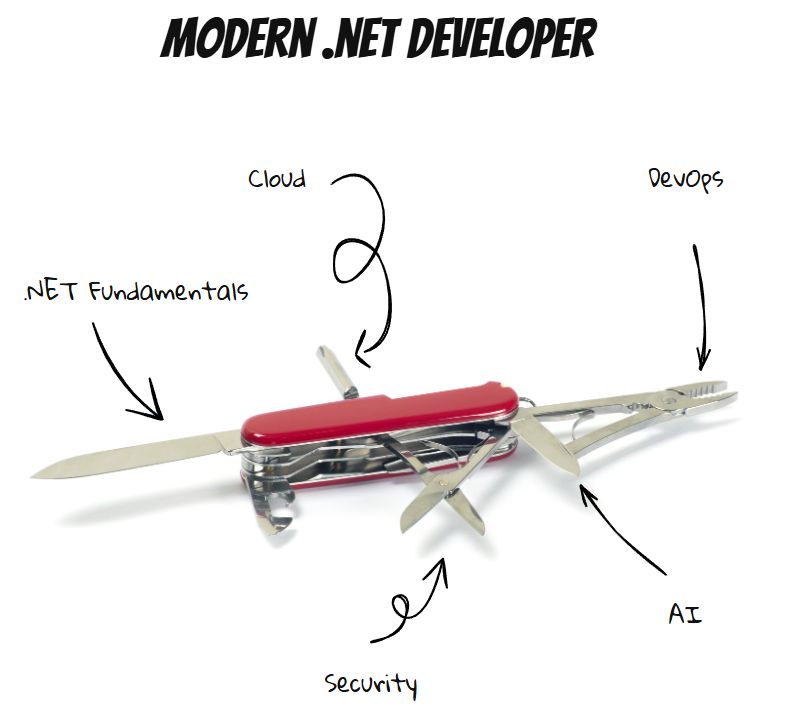
From Specialist to Swiss Army Knife

The modern .NET developer is no longer just a backend specialist. They are expected to be adaptable:

  • Application developer
  • Cloud architect
  • DevOps contributor
  • Security implementer
  • Systems thinker

Not every developer must master every area—but awareness across domains is increasingly required.

The New Reality

The job has evolved from writing features to building systems.

And while that can feel overwhelming, it’s also exciting. Developers now influence architecture, scalability, reliability, and user experience at a system-wide level.

The industry hasn’t just changed what we build.

It’s changed what it means to be a developer.

And in 2026, being versatile isn’t optional—it’s the job.