Project targeting multiple framework in .NET

Edit the .csproj file to support the target frameworks; for example change.

<TargetFramework>netcoreapp2.1</TargetFramework>
to:
<TargetFrameworks>netcoreapp2.1;net45</TargetFrameworks>

Make sure that you change the XML element changed from singular to plural (add the “s” to both the open and close tags).

Resources

https://docs.microsoft.com/en-us/nuget/create-packages/multiple-target-frameworks-project-file

Multi-Targeting Frameworks

Clarification on development framework in .NET

This always confuses me. Here is the summary;

  • .NET Framework – the original .NET, the one that ships on Windows and only on Windows; the current (and probably final) version of .NET Framework is 4.8
  • .NET Core – the evolution of .NET, that is not tied to the OS as much, with slightly different feature sets, and where most of the Microsoft .NET effort has been for the last few years; .NET Core 3.1 shipped recently
  • .NET Standard – an API definition (not implementation – akin to an interface) that allows a library to target a range of platforms in a single build, i.e. by targeting .NET Standard 2.0 a library can in theory run equivalently on .NET Core 3 and .NET Framework 4.6.2 (ish…) and others (Mono, Unity, etc), without needing to target each individually
  • .NET 5 – the next version of .NET Core; the naming deliberately emphasizes that there isn’t a two-pronged development future consisting of “Framework” and “Core”, but just one – this one – which isn’t “Core” in the “minimal” sense, but is in fact now a very rich and powerful runtime; .NET 4 was avoided to prevent versioning confusion between .NET 4.* and .NET Framework 4.* (and again, to emphasize that this is the future direction of .NET, including if you are currently on .NET Framework)

Sharing libraries between .Net Core and .Net Framework applications

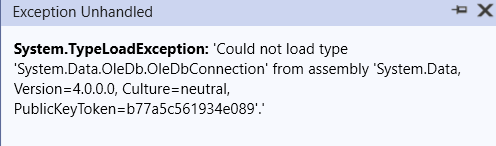
I was trying to reference a DLL targeting FW 4.6 in a host application targeting .NET Core 2.1. I started getting this error;

This is where I started to wonder, What’s the difference? How they can co-exist? How the host application can use them?

Microsoft recommend to target .NET Standard 2.0 when building reusable libraries, unless you need to support an earlier version. Most general-purpose libraries should not need APIs outside of .NET Standard 2.0. .NET Standard 2.0 is supported by all modern platforms and is the recommended way to support multiple platforms with one target.

.NET Core 2.1 and later versions support .NET Standard 2.0 and earlier versions.

There will be no new .NET Standard versions after 2.1. For more information, see .NET 5 and .NET Standard later in this article.

.NET Standard libraries and Visual Studio
In order to build .NET Standard libraries in Visual Studio, make sure you have Visual Studio 2019 or Visual Studio 2017 version 15.3 or later installed on Windows, or Visual Studio for Mac version 7.1 or later installed on macOS.

Start from here

Read about .NET standard here

A good explanation about libraries

Resources

Reflection – What are the benefits

Generally, when people talk about reflection, the main concern is the performance. Because it runs on runtime, so theoretically, it is a little bit slower than the normal application. But it is flexible for many scenarios, especially if you develop the framework. If it is acceptable to spend a few seconds (or only hundreds of milliseconds) to load assemblies, then feel free to use it.

Let’s walk through an example; We are going to use an interface called “ISpeaker”.

internal interface ISpeaker
{
    string SayHello();
}

Create three implementation classes:

English Speakers

internal class EnglishSpeaker : ISpeaker
{
    public string Name => this.GetType().ToString();
    public string SayHello()
    {
        return "Hello!";
    }
}

Urdu Speakers

internal class UrduSpeaker : ISpeaker
{
    public string Name => this.GetType().ToString();
    public string SayHello()
    {
        return "as-salaam-alaikum";
    }
}

Chinese Speakers

internal class ChineseSpeaker : ISpeaker
{
    public string Name => this.GetType().ToString();
    public string SayHello()
    {
        return "Nihao";
    }
}

Now we can use reflection to find all the implementations of ISpeaker interface and call their methods or properties.

internal class ReflectionHelper
{
    public static List<Type> GetAvailableSpeakers()
    {
        // You can also use AppDomain.CurrentDomain.GetAssemblies() to load all assemblies in the current domain.
        // Get the specified assembly.
        var assembly =
                Assembly.LoadFrom(Path.Combine(Directory.GetCurrentDirectory(), "ReflectionDemo.dll"));
        // Find all the types in the assembly.
        var types = assembly.GetTypes();
        // Apply the filter to find the implementations of ISayHello interface.
        var result = types.Where(x => x.IsClass && typeof(ISpeaker).IsAssignableFrom(x)).ToList();
        // Or you can use types.Where(x => x.IsClass && x.GetInterfaces().Contains(typeof(ISpeaker))).ToList();
        return result;
    }
}

In this class, we load the specified dll file that contains types we need. Then we can apply the LINQ query to find all the implementations of ISpeaker interface using Reflection.

Test the program output. we can output the name and call SayHello method of each speaker:

using ReflectionDemo;
using System.Reflection;

Console.WriteLine("Hello, World!");

Console.WriteLine("Here is the Reflection sample:");
// Find all the speakers in the current domain
var availableSpeakers = ReflectionHelper.GetAvailableSpeakers();
foreach (var availableSpeaker in availableSpeakers)
{
    // Create the instance of the type
    var speaker = Activator.CreateInstance(availableSpeaker);
    // Get the property info of the given property name
    PropertyInfo namePropertyInfo = availableSpeaker.GetProperty("Name");
    // Then you can get the value of the property
    var name = namePropertyInfo?.GetValue(speaker)?.ToString();
    Console.WriteLine($"I am {name}");
    // Invoke the method of the instance
    Console.WriteLine(availableSpeaker.InvokeMember("SayHello", BindingFlags.InvokeMethod, null, speaker, null));
}
Console.WriteLine();
Console.ReadKey();

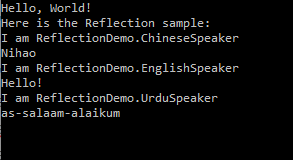
Run the program, you will see the below output:

If we need to add other speakers in other languages, just add the implementation classes in the same project. .NET reflection can automatically find out all the required classes and call the methods correctly.

It is extremely useful when we create the plugin-type applications. First we make the interfaces and call the methods from the client by reflection. Then we can create plugins following the interface for the client, which can be loaded as the *.dll files dynamically and executed.

Another scenario is for the framework development. As a framework developer, you will not be able to know what implementations the users will create, so you can only use reflection to create these instances. One example is in some MVVM frameworks, if you create the classes following the conventions, eg. xxxViewModel, the framework can find all the ViewModels and load them automatically using reflection.

The main namespaces we need to use for reflection are System.Reflection and System.Type. You may also need to know the below terms:

Resources

Reflection in .NET

Viewing Type Information

Dynamically Loading and Using Types

https://levelup.gitconnected.com/four-ways-to-generate-code-in-c-including-source-generators-in-net-5-9e6817db425

https://docs.microsoft.com/en-us/dotnet/core/tutorials/creating-app-with-plugin-support

Return multiple values to a method caller

This is a code sample for returning multiple values from a c# method. For example, imagine a method that accepts multiple parameters and return two parameters;

So far the best method that I have found is this;

public Tuple<int, int> GetMultipleValue()
{
     return Tuple.Create(1,2);
}

This works in .NET 4 and up. Tuples with two values have Item1 and Item2 as properties.

Here is a list of different methods;

1. ref / out parameters

using ref:

static void Main(string[] args)
{
    int a = 10;
    int b = 20;
    int add = 0;
    int multiply = 0;
    Add_Multiply(a, b, ref add, ref multiply);
    Console.WriteLine(add);
    Console.WriteLine(multiply);
}

private static void Add_Multiply(int a, int b, ref int add, ref int multiply)
{
    add = a + b;
    multiply = a * b;
}

using out:

static void Main(string[] args)
{
    int a = 10;
    int b = 20;
    int add;
    int multiply;
    Add_Multiply(a, b, out add, out multiply);
    Console.WriteLine(add);
    Console.WriteLine(multiply);
}

private static void Add_Multiply(int a, int b, out int add, out int multiply)
{
    add = a + b;
    multiply = a * b;
}

2. struct / class

struct Result
{
    public int add;
    public int multiply;
}
static void Main(string[] args)
{
    int a = 10;
    int b = 20;
    var result = Add_Multiply(a, b);
    Console.WriteLine(result.add);
    Console.WriteLine(result.multiply);
}

private static Result Add_Multiply(int a, int b)
{
    var result = new Result
    {
        add = a * b,
        multiply = a + b
    };
    return result;
}

using class:

class Result
{
    public int add;
    public int multiply;
}
static void Main(string[] args)
{
    int a = 10;
    int b = 20;
    var result = Add_Multiply(a, b);
    Console.WriteLine(result.add);
    Console.WriteLine(result.multiply);
}

private static Result Add_Multiply(int a, int b)
{
    var result = new Result
    {
        add = a * b,
        multiply = a + b
    };
    return result;
}

3. Tuple

static void Main(string[] args)
{
    int a = 10;
    int b = 20;
    var result = Add_Multiply(a, b);
    Console.WriteLine(result.Item1);
    Console.WriteLine(result.Item2);
}

private static Tuple<int, int> Add_Multiply(int a, int b)
{
    var tuple = new Tuple<int, int>(a + b, a * b);
    return tuple;
}

C# 7 Tuples

static void Main(string[] args)
{
    int a = 10;
    int b = 20;
    (int a_plus_b, int a_mult_b) = Add_Multiply(a, b);
    Console.WriteLine(a_plus_b);
    Console.WriteLine(a_mult_b);
}

private static (int a_plus_b, int a_mult_b) Add_Multiply(int a, int b)
{
    return(a + b, a * b);
}

C# 7 Tuples More..

(string, string, string) LookupName(long id) // tuple return type
{
    ... // retrieve first, middle and last from data storage
    return (first, middle, last); // tuple literal
}

which could then be used like this:

var names = LookupName(id);
WriteLine($"found {names.Item1} {names.Item3}.");

You can also provide names to your elements (so they are not “Item1”, “Item2” etc). You can do it by adding a name to the signature or the return methods:

(string first, string middle, string last) LookupName(long id) // tuple elements have names

or

return (first: first, middle: middle, last: last); // named tuple elements in a literal

They can also be deconstructed, which is a pretty nice new feature:

(string first, string middle, string last) = LookupName(id1); // deconstructing declaration

Resource

https://stackoverflow.com/questions/748062/return-multiple-values-to-a-method-caller