Why Web APIs Don’t Switch Environments at Runtime

A common misconception in modern web development is that a Web API can dynamically switch between environments—such as Test and Production—based on a runtime signal like a request header or UI selection. In practice, this is not how ASP.NET Core (or most backend frameworks) are designed to operate.

The Core Principle

When a Web API starts, it is initialized with a specific environment:

ASPNETCORE_ENVIRONMENT = Development | Test | Production

This environment determines:

  • Which configuration files are loaded (appsettings.{env}.json)
  • Connection strings and external resources
  • Logging behavior and security settings
  • Feature toggles and integrations

👉 This configuration is fixed at application startup and cannot be changed per request.


Why Runtime Switching Doesn’t Work

Even if a client sends something like:

X-Environment: Production

the API will still:

  • Use the configuration it loaded at startup
  • Connect to the same databases and services
  • Execute logic based on its deployed environment

In other words:

A request can express intent, but it cannot override the API’s runtime environment.


Common Misunderstanding

Developers often attempt to:

  • Add an environment dropdown in the UI
  • Pass the selected value via headers
  • Expect the backend to “switch” environments

This leads to confusion when:

  • Test works as expected
  • Production appears unresponsive or unchanged

Because the backend is still running in its original environment.


Correct Architectural Approaches

There are three valid patterns:

1. Separate Deployments (Recommended)

  • Test UI → Test API
  • Production UI → Production API

✔ Safe
✔ Standard
✔ Aligned with enterprise practices


2. Environment-Aware Logic (Advanced)

  • Use headers or parameters to route behavior manually
  • Maintain separate configs inside the same app

⚠ Complex and risky
⚠ Requires strict safeguards


3. Hybrid (Best for Operations Tools)

  • Backend environment remains fixed
  • UI shows environment context
  • Headers used for logging, validation, or guardrails

✔ Safe
✔ Flexible
✔ Practical


Key Takeaway

A Web API’s environment is a deployment concern, not a runtime switch.

Trying to dynamically switch environments at runtime can lead to:

  • Incorrect data access
  • Security risks
  • Unintended production actions

Final Thought

Instead of forcing runtime switching, design your system so that:

  • Environments are clearly separated
  • UI reflects environment context
  • Safety mechanisms protect production

This approach is not only more reliable—it’s essential for systems operating in regulated or high-risk domains.

Most .NET Developers Allocate Memory They Don’t Need To — Span Fixes That

If you work with .NET long enough, you eventually discover that performance issues rarely come from complex algorithms.

They come from small allocations happening millions of times.

And many of those allocations come from code that looks perfectly harmless.


The Hidden Problem: Unnecessary Heap Allocations

Consider common operations like:

  • .Substring()
  • .Split()
  • .ToArray()

These methods feel lightweight, but each one creates new objects on the heap.

That means:

  • More memory usage
  • More work for the garbage collector
  • More latency under load

In an API handling thousands of requests — or inside a tight parsing loop — these tiny costs accumulate quickly.


Enter Span<T>

Span<T> solves this by letting you work with existing memory instead of allocating new memory.

Think of it as:

A lightweight window into data that already exists.

No copying.
No allocations.
No extra GC pressure.


A Simple Example

Imagine you have a date string:

string date = "2025-06-15";

Most developers extract the year like this:

var year = date.Substring(0, 4);

This creates a brand-new string "2025" on the heap.

Now compare that with:

ReadOnlySpan<char> year = date.AsSpan(0, 4);

Same logical result — but zero allocation.

You’re simply pointing to a slice of the original string.


The Core Mental Model

A Span<T> does not own memory.

It only references memory that already exists.

Think of it like:

Original data  ───────────────
[ window ]
Span

You move the window around instead of copying the data.


Where Span<T> Really Shines

Once you understand the concept, you’ll start seeing opportunities everywhere:

Parsing workloads

  • CSV or log file parsing without generating thousands of temporary strings.

HTTP processing

  • Parse headers without copying byte arrays.

Binary protocols

  • Slice buffers directly instead of creating intermediate arrays.

String processing

  • Replace Split() calls that create multiple arrays and strings.

Real-World Impact

In production parsing-heavy services, teams commonly see:

  • 40–60% fewer allocations
  • Noticeably reduced GC pauses
  • Higher throughput under load

Less copying means more CPU time spent doing real work.


The Three Rules You Need to Remember

1️⃣ Span<T> lives on the stack

You cannot store it on the heap or in class fields.

2️⃣ Use ReadOnlySpan<T> for read-only data

Most string scenarios fall into this category.

3️⃣ Use Memory<T> when persistence is required

If you need to store or pass the reference beyond stack scope, use Memory<T>.


How to Adopt It Without a Big Rewrite

You don’t need to refactor your entire codebase.

Start small:

  1. Profile your application
  2. Identify hot paths
  3. Look for repeated Substring, Split, or ToArray calls
  4. Replace them with Span slicing
  5. Measure again

Performance improvements here are often immediate and measurable.


Final Thought

Most .NET performance problems aren’t about writing clever code.

They’re about avoiding unnecessary work.

Span<T> gives you a simple, safe way to reduce allocations and let your application scale more efficiently — without changing how your logic works.

Once you start using it in hot paths, it becomes difficult to go back.

The Modern .NET Developer in 2026: From Code Writer to System Builder

There was a time when being a .NET developer mostly meant writing solid C# code, building APIs, and shipping features. If the application worked and the database queries were fast enough, the job was done.

That world is gone.

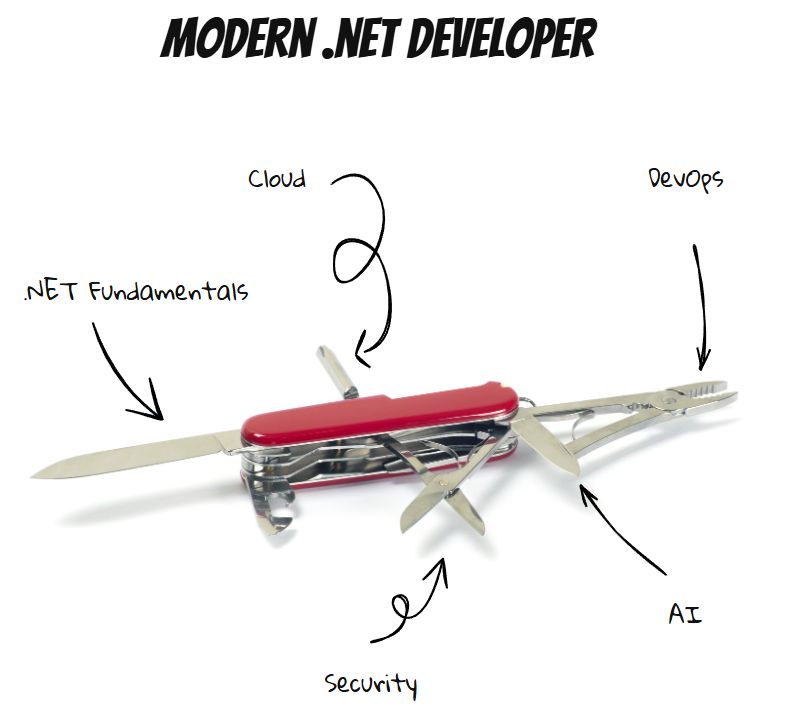
In 2026, a modern .NET developer isn’t just a coder. They’re a system builder, balancing application development, cloud architecture, DevOps, security, and increasingly, AI-driven decisions.

One Feature, Many Disciplines

Consider a typical modern feature:

  • A scheduled job populates data into a database.
  • That data feeds reporting tools like Power BI.
  • Deployment pipelines push updates across environments worldwide.
  • Cloud services scale automatically under load.
  • Monitoring and security controls are part of the delivery.

One feature now touches multiple domains. Delivering it requires understanding infrastructure, automation, data, deployment, and operations—not just application logic.

The scope of the role has expanded dramatically.

Fundamentals Still Matter

Despite all the change, the core skills haven’t disappeared.

Developers still need to:

  • Build REST APIs that handle real-world load
  • Write efficient Entity Framework queries
  • Understand async/await and concurrency
  • Maintain clean, maintainable codebases

Bad fundamentals still break systems, regardless of how modern the infrastructure is.

But fundamentals alone are no longer enough.

Cloud Decisions Are Now Developer Decisions

In many teams, developers now influence—or directly make—architecture decisions:

  • Should this workload run in App Service, Containers, or Functions?
  • Should data live in SQL Server or Cosmos DB?
  • Do we need messaging via Service Bus or event-driven patterns?

These choices affect cost, scalability, reliability, and operational complexity. Developers increasingly need architectural awareness, not just coding ability.

DevOps Is Part of the Job

Deployment is no longer someone else’s responsibility.

Modern developers are expected to:

  • Build CI/CD pipelines that deploy automatically
  • Containerize services using Docker
  • Ensure logs, metrics, and monitoring are available
  • Support production reliability

The boundary between development and operations has largely disappeared.

Security Is Developer-Owned

Security has shifted left.

Developers now regularly deal with:

  • OAuth and identity flows
  • Microsoft Entra ID integration
  • Secure data handling
  • API protection and access control

Security mistakes are expensive, and modern developers are expected to understand the implications of their implementations.

AI Changes How We Work

Another shift is happening quietly.

In the past, developers searched for how to implement something. Today, AI tools increasingly help answer higher-level questions:

  • What are the long-term tradeoffs of this architecture?
  • How will this scale?
  • What operational risks am I introducing?

The developer’s role moves from solving isolated technical problems to designing sustainable systems.

From Specialist to Swiss Army Knife

The modern .NET developer is no longer just a backend specialist. They are expected to be adaptable:

  • Application developer
  • Cloud architect
  • DevOps contributor
  • Security implementer
  • Systems thinker

Not every developer must master every area—but awareness across domains is increasingly required.

The New Reality

The job has evolved from writing features to building systems.

And while that can feel overwhelming, it’s also exciting. Developers now influence architecture, scalability, reliability, and user experience at a system-wide level.

The industry hasn’t just changed what we build.

It’s changed what it means to be a developer.

And in 2026, being versatile isn’t optional—it’s the job.

IDesign Method: An Overview

Software projects often start small and cute, but can quickly become unmanageable as requirements change. This transformation is usually due to the lack of an appropriate architecture, or an architecture that is not designed for future change.

The IDesign Method: An Overview
The IDesign method, developed by Juval Löwy, provides a systematic approach to creating a software architecture that will stand the test of time. Let’s explore its key principles.

Avoid functional decomposition
The first principle of IDesign is to avoid functional decomposition – the practice of translating requirements directly into services. For example, if you’re building an e-commerce platform, don’t create separate services for “user management”, “product catalogue” and “order processing” just because those are your main requirements. Instead, IDesign advocates a more thoughtful approach based on volatility.

Volatility based decomposition
IDesign focuses on identifying areas of volatility – aspects of the system that are likely to change over time. For example, in our e-commerce example, payment methods might be an area of volatility, as you may need to add new payment options in the future.

The three-step process:
Identify 3-5 core use cases
What your system does at its most basic level. For our e-commerce platform, these might be:

Browse and search for products
Manage shopping cart
Completing a purchase

Identify areas of volatility
Identify aspects of the system that are likely to change. In our e-commerce example:
Payment methods
Shipping options
Product recommendation algorithms

Define services
IDesign defines five types of services:
Client: Handles user interaction (e.g. web interface)
Manager: Orchestrates business use cases
Engine: Executes specific business logic
Resource Access: Handles data storage and retrieval
Utility: Provides cross-cutting functionality

For our e-commerce platform example we might have:

A ShoppingManager – to orchestrate the shopping process
A PaymentEngine – to handle different payment methods
A ProductCatalogAccess – to manage product data

Design Principles and Patterns

Great software is not written.
It’s designed.

Most systems don’t fail because of bad developers.
They fail because of bad design decisions made early — and scaled blindly.

This is the foundation every serious engineer and tech leader must master 👇

Design Principles & Patterns

🔹 SOLID

SRP – One class, one reason to change
OCP – Extend, don’t modify
LSP – Substitutions must be safe
ISP – Small, focused interfaces
DIP – Depend on abstractions, not concretes

SOLID isn’t theory. It’s how you avoid rewriting your system every 6 months.

🔹 GoF Design Patterns

1) Creational → Control how objects are created (Factory, Builder, Singleton)
2) Structural → Control how objects are composed (Adapter, Facade, Proxy)
3) Behavioral → Control how objects communicate (Strategy, Observer, Command)

Patterns are not “fancy code.”
They are battle-tested solutions to recurring problems.

🔹 DRY – Don’t Repeat Yourself
Duplication is a silent killer.
It multiplies bugs and slows teams.

🔹 KISS – Keep It Simple
Complexity is not intelligence.
Simplicity is.

🔹 MVC + Repository + Unit of Work
Clean separation of concerns.
Predictable codebases.
Scalable teams.

Reality check:

Frameworks change.
Languages change.
Trends change.

Principles don’t.

If you want to build:

Systems that scale
Teams that move fast
Products that survive years

Master the fundamentals.

Everything else is noise.