How do we access the configuration settings in the Middleware component in ASP.NET Core applications?
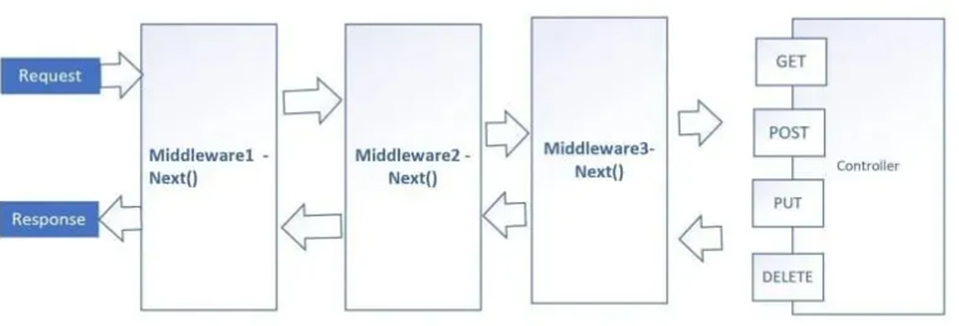
As we know middleware is a component that is used in the application pipeline to handle requests and responses which can help perform pre and post-operation within the request and response API pipeline.
We will be using two approaches, one with simple configuration and second with IOptions pattern. You can read more about it here;
https://docs.microsoft.com/en-us/aspnet/core/fundamentals/configuration/options?view=aspnetcore-6.0
Create ASP.NET Core API application based on .NET Core 3.1. We will be using this configuration;
{
  "Logging": {
    "LogLevel": {
      "Default": "Information",
      "Microsoft": "Warning",
      "Microsoft.Hosting.Lifetime": "Information"
    }
  },
  "GlobalConfigurationSettings": {
    "LowerEnvironment": "true",
    "CustomerConfig": {
      "CustomerKeyurl": "http://customer/key",
      "CustomerdetailsUrl": "http://customer/id",
      "Agency": {
        "AgencyID": "subvalue1_from_json",
        "AccountKey": 200
      }
    },
    "AllowedHosts": "*"
  }
}
This is a generic custom middleware;
public class CustomMiddleware
{
   private readonly RequestDelegate _next;

   public CustomMiddleware(RequestDelegate next)
   {
       _next = next;
   }

   public async Task InvokeAsync(HttpContext httpContext)
   {
       try
       {
           await _next(httpContext);
       }
       catch (Exception ex)
       {
           throw ex;
           //_logger.LogError($"Something went wrong: {ex.Message}");
       }
   }
}
Approach 1- Using IConfiguration to load the Config settings in Middleware
This approach does not require any custom interface. When CreateDefaultBuilder runs, it load application configuration by default from appsettings.json. This is available to any component in the application.
We are going to inject RequestDelegete and IConfiguration from the constructor in middleware;
public class MiddlewareWithIConfiguration
    {
        private readonly RequestDelegate _next;
        private readonly IConfiguration _configurationSettings;

        public MiddlewareWithIConfiguration(RequestDelegate next, IConfiguration optionsSettings)
        {
            _next = next;
            _configurationSettings = optionsSettings;
        }
Implement InvokeAsync (assuming we need asynchronous middleware behavior) method.
public async Task InvokeAsync(HttpContext httpContext)
        {
            try
            {
                var customerKeyUrl = _configurationSettings["GlobalConfigurationSettings:CustomerConfig:CustomerKeyurl"];
                Console.WriteLine($"Middleware using IConfiguration {customerKeyUrl}");
                await _next(httpContext);
            }
            catch (Exception ex)
            {
                throw ex;
                //_logger.LogError($"Something went wrong: {ex.Message}");
            }
        }
Add this line to Startup.cs file;
public void Configure(IApplicationBuilder app, IWebHostEnvironment env)
{

            app.UseMiddleware<MiddlewareWithIConfiguration>();
}
Approach 2 – Using IOption to load the Config settings in Middleware
We need to add and configure IOptions in Startup.cs file;
public void ConfigureServices(IServiceCollection services)
        {
            //Add functionality to inject IOptions<T>
            services.AddOptions();
            services.Configure<GlobalConfigurationSettings>(Configuration.GetSection("GlobalConfigurationSettings"));
}
We need a custom class to load configuration settings;
    public class GlobalConfigurationSettings
    {
        public string LowerEnvironment { get; set; }
        public CustomerConfig CustomerConfig { get; set; }
    }

    public class CustomerConfig
    {
        public string CustomerKeyurl { get; set; }
        public string CustomerdetailsUrl { get; set; }
        public Agency Agency { get; set; }
    }
Finally, we will be injecting RequestDelegete and IOptions from the constructor in middleware;
public class MiddlewareWithIOptions
    {
        private readonly RequestDelegate _next;
        private readonly GlobalConfigurationSettings _configurationSettings;

        public MiddlewareWithIOptions(RequestDelegate next, IOptions<GlobalConfigurationSettings> optionsSettings)
        {
            _next = next;
            _configurationSettings = optionsSettings.Value;
        }
And InvokeAsync method;
        public async Task InvokeAsync(HttpContext httpContext)
        {
            try
            {
                var lowerEnvironment = _configurationSettings.LowerEnvironment;
                var customerKeyUrl = _configurationSettings.CustomerConfig.CustomerKeyurl;
                Console.WriteLine($"Middleware using IOptions {lowerEnvironment} - {customerKeyUrl}");
                await _next(httpContext);
            }
            catch (Exception ex)
            {
                throw ex;
                //_logger.LogError($"Something went wrong: {ex.Message}");
            }
        }
Add this line to Startup.cs file;
public void Configure(IApplicationBuilder app, IWebHostEnvironment env)
{

            app.UseMiddleware<MiddlewareWithIOptions>();
}
If we want to restrict URL segment, we can write InvokeMethods like this;
       public async Task Invoke(HttpContext context)
        {
            if (context.Request.Path.StartsWithSegments("/swagger")
                && !context.User.Identity.IsAuthenticated)
            {
                context.Response.StatusCode = StatusCodes.Status401Unauthorized;
                return;
            }

            await _next.Invoke(context);
        }
For an example in controllers, refer to this article;
Resources
https://docs.microsoft.com/en-us/aspnet/core/fundamentals/configuration/?view=aspnetcore-6.0