How to Rename a SharePoint Online Tenant Domain (Microsoft 365 Tenant Rename Guide)

If you created your Microsoft 365 tenant years ago, your SharePoint URL probably looks something like this:

youroldname.sharepoint.com

The problem? That name is tied to your original .onmicrosoft.com domain — and it becomes part of every SharePoint and OneDrive URL.

If you’re building a professional business presence, especially for government or enterprise clients, you may want to rename your SharePoint tenant domain.

This guide walks through how to rename a SharePoint Online tenant using PowerShell safely and correctly.


Why Rename Your SharePoint Tenant Domain?

Renaming your SharePoint Online domain helps:

  • Align URLs with your legal business name
  • Improve branding consistency
  • Present professional collaboration links
  • Avoid technical debt later
  • Separate dev and production tenants

Microsoft allows a SharePoint tenant rename only once, so it’s important to do it carefully.


Important Limitations Before You Start

Before renaming your Microsoft 365 tenant domain:

  • You must be a Global Administrator
  • Rename must be scheduled at least 24 hours in advance
  • Not supported in GCC High or DoD environments
  • Large tenants may experience longer processing time
  • Existing links will redirect for 1 year only

If your tenant is new or lightly used, this is the safest time to perform the rename.


Step 1: Add a New .onmicrosoft.com Domain

You cannot rename SharePoint directly to a custom domain like yourcompany.com.

Instead, you must create a new Microsoft-managed domain:

  1. Go to Microsoft 365 Admin Center
  2. Navigate to Settings → Domains
  3. Select Add onmicrosoft.com domain (preview)
  4. Enter your desired name

Example:

tanolisllc.onmicrosoft.com

Make sure:

  • Status shows “Healthy”
  • Do not remove the original domain
  • Do not set it as fallback

Step 2: Install SharePoint Online Management Shell

Tenant rename must be executed from Windows PowerShell (5.1).

Do NOT use:

  • Azure Cloud Shell
  • WSL (Ubuntu)
  • PowerShell 7

Install the module:

Install-Module -Name Microsoft.Online.SharePoint.PowerShell

Step 3: Connect to SharePoint Admin

Use the existing admin URL (before rename):

Connect-SPOService -Url https://youroldtenant-admin.sharepoint.com

Login using Global Admin credentials.


Step 4: Validate the Rename with WhatIf

Always test first:

Start-SPOTenantRename -DomainName "tanolisllc" -ScheduledDateTime "2026-02-13T23:30:00" -WhatIf

If there are no blocking errors, you are ready to proceed.


Step 5: Schedule the SharePoint Tenant Rename

Remove -WhatIf:

Start-SPOTenantRename -DomainName "tanolisllc" -ScheduledDateTime "2026-02-13T23:30:00"

If successful, you will see:

Success
RenameJobID : <GUID>

This confirms the rename job has been scheduled.

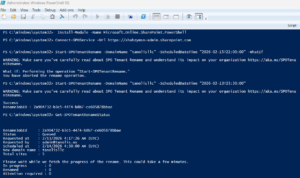
Here is a working snapshot of Powershell commands;


Step 6: Monitor Rename Status

You can check status anytime:

Get-SPOTenantRenameStatus

Possible states:

  • Scheduled
  • InProgress
  • Success

Small tenants typically complete within 30–90 minutes.


What Changes After Renaming?

Old URL:

https://youroldtenant.sharepoint.com

New URL:

https://newtenantname.sharepoint.com

Old links will automatically redirect for one year.

Important:

  • Email addresses are NOT affected
  • Custom domains are NOT changed
  • Azure subscriptions are NOT impacted

Post-Rename Checklist

After completion:

  • Test SharePoint homepage
  • Test OneDrive access
  • Test Microsoft Teams
  • Update bookmarks
  • Validate external sharing links

If OneDrive was locally synced, you may need to reconnect it.


Best Practices for Microsoft 365 Tenant Rename

  • Rename before scaling usage
  • Keep dev and production tenants separate
  • Align tenant name with legal entity
  • Schedule rename during off-hours
  • Document the RenameJobID for audit purposes

Tenant naming is part of cloud governance and identity architecture — not just branding.


Final Thoughts

Renaming your SharePoint Online tenant is a one-time decision that affects every collaboration link your organization generates.

If you’re early in your Microsoft 365 lifecycle, it’s worth doing right.

Clean identity structure today prevents technical debt tomorrow.

The Zipline Playbook (David vs. Goliath)

In the race to automate the future, the loudest voices often lose. The real transformation happens quietly, forged by teams who are out of money, out of time, and backed into a corner. This is the story of how a small startup, once dismissed as a sideshow, is becoming a quiet giant poised to take on the $14 trillion global logistics industry. It is the story of how they out-executed Amazon, the most powerful and logistics-obsessed company on Earth.

They didn’t win by having more. They won by having less. This is the Zipline Playbook, and its core lesson is this: adapting to constraints forces clarity, speed, and precision. It builds urgency and urgency is how you win.

In engineering, five constraints surface again and again:

  1. Time: When delay means irrelevance or death
  2. Budget: When every dollar must perform miracles
  3. Resources: When a 20-person team must achieve what a 2,000-person division cannot
  4. Technical: When the laws of physics make no exceptions
  5. Regulatory: When seeking permission is part of the engineering process itself

These are not blockers. They are the blueprint.

On December 1st, 2013, during an episode of 60 Minutes, Jeff Bezos introduced Amazon Prime Air, a new drone delivery concept that reflected the company’s growing ambitions. At the time, Amazon was already a dominant force in global commerce, with a market cap exceeding $119 billion, annual revenue approaching $74.5 billion, a workforce of more than 117,000, and a rapidly expanding network of 50 fulfillment centers worldwide. Bezos presented Prime Air not as a distant dream, but as a natural extension of Amazon’s logistics capabilities.

The underlying math was shocking. More than 86% of Amazon’s orders weigh under 5-lb. Swap a 4,000-lb gas van for a 15-lb electric drone, and you trade traffic for direct flight, diesel for electrons, and “arriving in 2 days” for “landing in 30 minutes.” Operating costs would plummet. Bezos told Charlie Rose that this wasn’t a distant dream. He predicted drones would be delivering packages to customers in as little as 4 to 5 years.

But as Amazon’s vision captivated the media, a fledgling startup was approaching the same problem from the opposite direction. Its founder, Keller Rinaudo Cliffton, had seen the orange Kiva robots automating warehouses for Amazon and had a simple, world-changing thought: someone needed to build Kiva for outside the warehouse. He envisioned an automated, on-demand logistics network that could serve everyone on Earth.

Keller and his team knew that to achieve this grand vision, they first needed a beachhead, a single, critical use case where the need was desperate and the value of their solution was undeniable. They strategically chose healthcare logistics. A life-or-death delivery commands more willingness to pay, and, crucially, they believed it would give them a compelling case for regulatory approval.

And therein lay the regulatory constraint. Between 2014 and 2016, FAA rules made Zipline’s model of long-range, autonomous delivery effectively impossible in the United States. With no money, no reputation, and no operational data, they couldn’t afford to spend years trapped in a regulatory holding pattern. While Amazon stayed domestic and became mired in delays, Zipline made the hard call to leave. Rwanda offered something the U.S. couldn’t: a government willing to move fast, a healthcare system in urgent need, and a real-world proving ground for their technology.

Armed with this strategy, they arrived in Rwanda with an audacious pitch for the Minister of Health: Zipline would build and operate a national, on-demand delivery service for all medical products, to every hospital and clinic in the country. The Minister listened, then cut through their sprawling vision with a simple, focusing order: “Keller, shut up. Just do blood.”

Blood was a logistical nightmare and a matter of life and death. Platelets last only five days and require constant agitation. Red blood cells need refrigeration and expire in 42 days. It was the perfect, intensely painful problem to solve.

The contract with the Rwandan government was both a lifeline and a ticking clock. Zipline was operating on a shoestring budget, having raised a small Series A in 2012 and a couple extensions in 2015, a rounding error for a company like Amazon. This severe budget constraint meant there was no room for error or expensive R&D detours; every dollar had to be stretched to its limit. Compounding this was an intense time constraint: they had to get a functional system operational, and quickly, to prove their concept. Failure meant the company would die.

The technical constraint was just as unforgiving. Designing an autonomous fixed-wing aircraft that could catapult-launch, navigate mountainous terrain, drop with meter-level precision, and survive tropical storms was already a daunting engineering challenge, especially in 2015 when the tech was still new. But the drone itself made up only 15% of the real technical complexity. The remaining 85% lived behind the scenes: air-traffic-control dashboards for regulators, computer-vision pre-flight checks, detect-and-avoid systems so multiple drones could share airspace safely, and a data pipeline that logged a gigabyte from every flight to improve reliability. These challenges couldn’t be solved by theorizing in a lab or designing in an ivory tower. They had to be solved by building in the field, side by side with customers, and stripping away anything that didn’t matter. The sheer amount of technical complexity demanded brutal focus. Every decision had to serve the mission. Everything else had to go.

The resource constraint showed up immediately. They had only 20 people. That alone was crazy. For nine long months, they served just one hospital. The system was fragile. Every delivery was a fight. Unlike at Amazon, where massive teams handle tightly scoped problems, Zipline’s engineers had to do everything themselves. There were no handoffs or buffers. The same people who wrote the flight code also built launchers, tested recovery systems, and built hardware out of shipping containers. All-nighters, working weekends, and live-debugging were the baseline. Amazon had forklifts, global infrastructure, and billions of dollars. Zipline had twenty people, a mission, and no other option. This constraint forced them to do ten times more with one-tenth the people.

After nine months, it was running reliably. In the next three months, Zipline expanded service to the remaining 20 hospitals in the contract. Then 50. Then 400 primary care clinics across Rwanda. From that single, fragile beachhead, they scaled across the world: Ghana, Nigeria, Côte d’Ivoire, Japan, the United States. Walmart signed on. So did Intermountain Health. And the NHS. By 2023, Zipline had flown over 50 million autonomous miles and served more than 3,000 hospitals and clinics across four continents. Rwanda awarded them a $61 million national contract, making Zipline the backbone of its healthcare logistics.

Here, the paradoxical power of constraint reveals itself. An unconstrained company with a massive budget has the luxury of chasing complexity, building elegant systems in labs, stacking features no one asked for, and perfecting technology that drifts further from real customer needs. A constrained startup has no such luxury. Zipline had to adapt by solving the single most important problem for a real customer, because that was the only path to survival. Every decision had to earn its place. While Amazon spent billions developing a flashy rotor-based drone, Zipline built a fixed-wing aircraft because it was the best way to solve their customer’s problem. A fixed-wing airframe covers more ground, uses less power, and is simpler to maintain. That choice, driven by necessity, shaped everything.

Ironically, the company famous for being customer-obsessed built something no real customer asked for, while Zipline, under pressure and constraint, listened closely. A customer couldn’t have been more direct: shut up, just do blood.

This became their philosophy. Zipline was never the best funded or flashiest team. Their edge came from adapting faster by being relentlessly practical. They did not optimize for prestige. They optimized for reality. And they understood that the most important engineering insights do not come from whiteboards or design reviews. They come from customers, from real-world use, and from the painful, humbling lessons that only surface when your product is live and every mistake matters.

Abundance breeds complexity. Constraint forces a brutal elegance. Stripping away everything non-essential didn’t just make the system cheaper. It made it better. Today, Zipline has flown over 100 million autonomous miles, completed more than 1.5 million deliveries, and most impressively, done it all without a single human safety incident. Meanwhile, Amazon is still demoing. Prime Air made its first deliveries in late 2022, nearly a decade after its TV debut. In January 2025, it grounded flights after a rain-induced crash exposed a software fault. Today, it has completed fewer than one hundred deliveries. Zipline crossed a million deliveries before Amazon crossed a hundred. While Amazon’s drones dropped boxes in suburban cul-de-sacs, Zipline was flying through tropical storms, over mountains, and under dense air-traffic control. Checkmate.

The divergence wasn’t an accident. It was the technology hype cycle in action. The initial excitement for drone delivery obscured the immense, underlying complexity of the problem. While others operated in the bubble of hype, Zipline spent a decade in the “trough of disillusionment,” the long, painful period where the actual work gets done.

Designing Safer Production Releases: A Practical Journey with Azure DevOps

Production systems don’t usually fail because of missing tools.
They fail because too much happens implicitly.

A merge triggers a deploy.
A fix goes live unintentionally.
Weeks later, no one is entirely sure what version is actually running.

This article documents a deliberate shift I made in how production releases are handled—moving from implicit deployment behavior to explicit, intentional releases using Git tags and infrastructure templates in Azure DevOps.

This wasn’t about adding complexity.
It was about removing ambiguity.


The Problem I Wanted to Solve

Before the change, the release model had familiar weaknesses:

  • Merges to main were tightly coupled to deployment
  • Production changes could happen without a conscious “release decision”
  • Version visibility in production was inconsistent
  • Pipelines mixed application logic and platform concerns

None of this caused daily failures—but it created latent risk.

The question I asked was simple:

How do I make production boring, predictable, and explainable?


The Guiding Principles

Instead of starting with tooling, I started with principles:

  1. Production changes must be intentional
  2. Releases must be immutable and auditable
  3. Application code and platform logic should not live together
  4. Developers should not need to understand deployment internals
  5. The system should scale from solo to enterprise without redesign

Everything else followed from these.


The Core Decision: Tag-Based Releases

The single most important change was this:

Production deployments are triggered only by Git tags.

Not by merges.
Not by branch updates.
Not by UI clicks.

A release now requires an explicit action:

git tag vX.Y.Z
git push origin vX.Y.Z

That’s the moment a human says: “This is production.”


Separating Responsibilities with Repositories

To support this model cleanly, responsibilities were split across two repositories:

Application Repository

  • Contains UI, APIs, and business logic
  • Has a single, thin pipeline entry file
  • Decides when to release (via tags)

Infrastructure Repository

  • Contains pipeline templates and deployment logic
  • Builds and deploys applications
  • Defines how releases happen

This separation ensures:

  • Platform evolution doesn’t pollute application repos
  • Multiple applications can share the same release model
  • Infrastructure changes are treated as infrastructure—not features

Pipelines as Infrastructure, Not Code

A key mindset shift was treating pipelines as platform infrastructure.

That meant:

  • Pipeline entry files are locked behind PRs
  • Changes are rare and intentional
  • Developers generally don’t touch them
  • Deployment logic lives outside the app repo

This immediately reduced accidental breakage and cognitive load.


Versioning: Moving from Build-Time to Runtime

Once releases were driven by tags, traditional assembly-based versioning stopped being useful—especially for static web applications.

Instead, version information is now injected at build time into a runtime artifact:

/version.json

Example:

{ "version": "v2.0.5" }

The application reads this file at runtime to display its version.

This approach:

  • Works cleanly with static hosting
  • Reflects exactly what was released
  • Is easy to extend with commit hashes or timestamps
  • Decouples versioning from build tooling

The Day-to-Day Experience

After the setup, daily work became simpler—not more complex.

  • Developers work in feature branches
  • Code is merged into main without fear
  • Nothing deploys automatically
  • Production changes require an explicit tag

Releases are boring.
And that’s exactly the goal.


Rollbacks and Auditability

Because releases are immutable:

  • Redeploying a version is trivial
  • Rollbacks are predictable
  • There’s always a clear answer to: “What code is running in production?”

This is especially valuable in regulated or client-facing environments.


Tradeoffs and Honest Costs

This approach isn’t free.

Costs:

  • Initial setup takes time
  • Azure DevOps YAML has sharp edges
  • Pipelines must exist before tags will trigger
  • Early experimentation may require tag resets

Benefits:

  • Zero accidental prod deploys
  • Clear ownership and accountability
  • Clean separation of concerns
  • Reusable platform foundation
  • Long-term operational confidence

For long-lived systems, the tradeoff is worth it.


When This Pattern Makes Sense

This model works best when:

  • Production stability matters
  • Systems are long-lived
  • Auditability or compliance is a concern
  • Teams want clarity over convenience

It’s less suitable for:

  • Hackathons
  • Throwaway prototypes
  • “Merge = deploy” cultures

The Leadership Lesson

The most important takeaway wasn’t technical.

Good systems make intent explicit.
Great systems remove ambiguity from critical outcomes.

Production safety doesn’t come from moving slower.
It comes from designing systems where important changes happen on purpose.


Final Thoughts

This wasn’t about Azure DevOps specifically.
The same principles apply anywhere.

If you can answer these questions clearly, you’re on the right path:

  • Who decided this went to production?
  • When did that decision happen?
  • What exactly was released?

If those answers are obvious, production becomes boring.

And boring production is a feature.

WordPress on Azure Container Apps (ACA)

Architecture, Backup, and Recovery Design

1. Overview

This document describes the production architecture for WordPress running on Azure Container Apps (ACA) with MariaDB, including backup, recovery, monitoring, and automation. The design prioritizes:

  • Low operational overhead
  • Cost efficiency
  • Clear separation of concerns
  • Fast, predictable recovery
  • No dependency on VM-based services or Backup Vault

This architecture is suitable for long-term operation (multi‑year) with minimal maintenance.


2. High-Level Architecture

Core Components

  • Azure Container Apps Environment
    • Hosts WordPress and MariaDB container apps
  • WordPress Container App (ca-wp)
    • Apache + PHP WordPress image
    • Stateless container
    • Persistent content via Azure Files
  • MariaDB Container App (ca-mariadb)
    • Dedicated container app
    • Internal-only access
    • Database for WordPress
  • Azure Files (Storage Account: st4wpaca)
    • File share: wpcontent
    • Mounted into WordPress container
    • Stores plugins, themes, uploads, logs
  • Azure Blob Storage
    • Stores MariaDB logical backups (.sql.gz)

3. Data Persistence Model

WordPress Files

  • wp-content directory is mounted to Azure Files
  • Includes:
    • Plugins
    • Themes
    • Uploads
    • Logs (debug.log)

Database

  • MariaDB runs inside its own container
  • No local persistence assumed
  • Database durability ensured via daily logical backups

4. Backup Architecture

4.1 WordPress Files Backup (Primary)

Method: Azure Files Share Snapshots

  • Daily snapshots of wpcontent file share
  • Snapshot creation automated via Azure Automation Runbook
  • Retention enforced (e.g., 14 days)

Why this works well:

  • Instant snapshot creation
  • Very fast restore
  • Extremely low cost
  • No application involvement

4.2 MariaDB Backup (Primary)

Method: Logical database dumps (mysqldump)

  • Implemented via Azure Container App Jobs
  • Backup job runs on schedule (daily)
  • Output compressed SQL file
  • Stored in Azure Blob Storage

Additional Jobs:

  • Cleanup job to enforce retention
  • Restore job for controlled database recovery

4.3 Backup Automation

Azure Automation Account (aa-wp-backup)

  • Central automation control plane
  • Uses system-assigned managed identity
  • Hosts multiple runbooks:
    • Azure Files snapshot creation
    • Snapshot retention cleanup

Key Vault Integration:

  • Secrets stored in kv-tanolis-app
    • Storage account key
    • MariaDB host
    • MariaDB user
    • MariaDB password
    • MariaDB database name
  • Automation and jobs retrieve secrets securely

5. Restore Scenarios

Scenario 1: Restore WordPress Files Only

Use case:

  • Plugin or theme deletion
  • Media loss

Steps:

  1. Select Azure Files snapshot for wpcontent
  2. Restore entire share or specific folders
  3. Restart WordPress container app

Scenario 2: Restore Database Only

Use case:

  • Content corruption
  • Bad plugin update

Steps:

  1. Download appropriate SQL backup from Blob
  2. Execute restore job or import via MariaDB container
  3. Restart WordPress container
  4. Save permalinks in WordPress admin

Scenario 3: Full Site Restore

Use case:

  • Major failure
  • Security incident
  • Rollback to known-good state

Steps:

  1. Restore Azure Files snapshot
  2. Restore matching MariaDB backup
  3. Restart WordPress container
  4. Validate site and permalinks

6. Monitoring & Alerting

Logging

  • Azure Container Apps logs
  • WordPress debug log (wp-content/debug.log)

Alerts

  • MariaDB backup job failure alert
  • Container restart alerts
  • Optional resource utilization alerts

External Monitoring

  • HTTP uptime checks for site availability

7. Security Considerations

  • No public access to MariaDB container
  • Secrets stored only in Azure Key Vault
  • Managed Identity used for automation
  • No credentials embedded in scripts
  • Optional IP restrictions for /wp-admin

8. Cost Characteristics

  • Azure Files snapshots: very low cost (delta-based)
  • Azure Blob backups: pennies/month
  • Azure Automation: within free tier for typical usage
  • No Backup Vault protected-instance fees

Overall cost remains low single-digit USD/month for backups.


9. Operational Best Practices

  • Test restore procedures quarterly
  • Keep file and DB backups aligned by date
  • Maintain at least 7–14 days retention
  • Restart WordPress container after restores
  • Document restore steps for operators

10. Summary

This architecture delivers:

  • Reliable backups without over-engineering
  • Fast and predictable recovery
  • Minimal cost
  • Clear operational boundaries
  • Long-term maintainability

It is well-suited for WordPress workloads running on Azure Container Apps and avoids VM-centric or legacy backup models.

Building a Practical Azure Landing Zone for a Small Organization — My Hands-On Journey

Over the past few weeks, I went through the full process of designing and implementing a lean but enterprise-grade Azure Landing Zone for a small organization. The goal wasn’t to build a complex cloud platform — it was to create something secure, governed, and scalable, while remaining simple enough to operate with a small team.

This experience helped me balance cloud architecture discipline with practical constraints, and it clarified what really matters at this scale.

Here’s what I built, why I built it that way, and what I learned along the way.


🧭 Starting with the Foundation: Management Groups & Environment Separation

The first step was establishing a clear environment structure. Instead of allowing resources to sprawl across subscriptions, I organized everything under a Landing Zones management group:

Tenant Root
 └─ Landing Zones
     ├─ Development
     │   └─ Dev Subscription
     └─ Production
         └─ Prod Subscription

This created clear separation of environments, enforced consistent policies, and gave the platform team a single place to manage governance.

For a small org, this structure is lightweight — but future-proof.


🔐 Designing RBAC the Right Way — Without Over-Permissioning

Next came access control — usually the most fragile part of small Azure environments.

I replaced ad-hoc permissions with a clean RBAC model:

  • tanolis-platform-adminsOwner at Landing Zones MG (inherited)
  • Break-glass account → Direct Owner for emergencies only
  • Dev users → Contributor or RG-scoped access only in Dev
  • Prod users → Reader by default, scoped contributor only when justified

No direct Owner permissions on subscriptions.
No developers in Prod by default.
Everything through security groups, not user assignments.

This drastically reduced risk, while keeping administration simple.


🧯 Implementing a Real Break-Glass Model

Many organizations skip this — until they get locked out.

I created a dedicated break-glass account with:

  • Direct Owner at the Landing Zones scope
  • Strong MFA + secure offline credential storage
  • Sign-in alerts for monitoring
  • A documented recovery runbook

We tested recovery scenarios to ensure it could restore access safely and quickly.

It wasn’t about giving more power — it was about preventing operational dead-ends.


🛡️ Applying Policy Guardrails — Just Enough Governance

Instead of trying to deploy every policy possible, I applied a starter baseline:

  • Required resource tags (env, owner, costCenter)
  • Logging and Defender for Cloud enabled
  • Key Vault protection features
  • Guardrails against unsafe exposure where reasonable

The focus was risk-reduction without friction — especially important in small teams where over-governance leads to shadow IT.


🧱 Defining a Simple, Scalable Access Model for Workloads

For Dev workloads, I adopted Contributor at subscription or RG level, depending on the need.
For Prod, I enforced least privilege and scoped access.

To support this, I created a naming convention for access groups:

<org>-<env>-<workload>-rg-<role>

Examples:

  • tanolis-dev-webapi-rg-contributors
  • tanolis-prod-data-rg-readers

This makes group intent self-documenting and audit-friendly — which matters more as environments grow.


📘 Documenting the Platform — Turning Architecture into an Operating Model

Technology wasn’t the final deliverable — operability was.

I created lightweight but meaningful platform artifacts:

  • Platform Operations Runbook
  • Subscription & Environment Register
  • RBAC and access governance model
  • Break-glass SOP and validation checklist

The goal was simple:

The platform should be understandable, supportable, and repeatable — not just functional.


🎯 What This Experience Reinforced

This project highlighted several key lessons:

  • 🟢 Small orgs don’t need complex cloud — they need clear boundaries and discipline
  • 🟢 RBAC and identity design matter more than tools or services
  • 🟢 A working break-glass model is not optional
  • 🟢 Policies should guide, not obstruct
  • 🟢 Documentation doesn’t have to be heavy — just intentional
  • 🟢 Good foundations reduce future migration and security pain

A Landing Zone is not just a technical construct — it’s an operating model for the cloud.


🚀 What’s Next

With governance and identity foundations in place, the next evolution will focus on:

  • Network & connectivity design (simple hub-lite or workload-isolated)
  • Logging & monitoring baselines
  • Cost governance and budgets
  • Gradual shift toward Infrastructure-as-Code
  • Backup, DR, and operational resilience

Each step can now be layered safely — because the core platform is stable.


🧩 Final Thought

This experience reinforced that even in small environments, doing cloud “the right way” is absolutely achievable.

You don’t need a massive platform team — you just need:

  • good structure
  • intentional governance
  • and a mindset of sustainability over quick wins.

That’s what turns an Azure subscription into a true Landing Zone.