Store and Read Objects from Session in ASP.NET Core

Here you go;

In your Startup.cs, under the Configure method, add the following line:

public void Configure(IApplicationBuilder app, IHostingEnvironment env)
{
app.UseSession();
}

And under the ConfigureServices method, add the following line:

public void ConfigureServices(IServiceCollection services)
{
  //Added for session state
  services.AddDistributedMemoryCache();

  services.AddSession(options =>
  {
  options.IdleTimeout = TimeSpan.FromMinutes(10);               
  });
}

The simple method to store and read data from session is;

# In a class;
Session.SetString("Email", "foo.com"); //store data
Session.GetString("Email"); //read data

# In Razor pages
@using Microsoft.AspNetCore.Http; 
string CustomerEmail = String.Empty;
@if (Context.Session.GetString("Email") != null)
 {
     CustomerEmail = Context.Session.GetString("Email").ToString();
 }
}

# You can use it in Razor markup 
<ul class="navbar-nav mr-auto float-right">
   <li class="nav-item">
      <span class="navbar-text text-light">Hello @CustomerEmail</span>
   </li>

</ul>

In order to store complex objects in your session in .NET Core, follow the following steps:

Create a model class of your object type (in your case EmployeeDetails):

public class EmployeeDetails
{
    public string EmployeeId { get; set; }
    public string DesignationId { get; set; }
}

Then create a SessionExtension helper to set and retrieve your complex object as JSON:

public static class SessionExtensions
{
  public static void SetObjectAsJson(this ISession session, string key, object value)
   {
     session.SetString(key, JsonConvert.SerializeObject(value));
   }

   public static T GetObjectFromJson<T>(this ISession session, string key)
   {
     var value = session.GetString(key);
     return value == null ? default(T) : JsonConvert.DeserializeObject<T>(value);
   }
}

Then finally set the complex object in your session as:

var employee = new EmployeeDetails();
employee.EmployeeId = "1";
employee.DesignationId = "2";

HttpContext.Session.SetObjectAsJson("EmployeeDetails", employee);

To retrieve your complex object in your session:

var employeeDetails = HttpContext.Session.GetObjectFromJson<EmployeeDetails>("EmployeeDetails");
int employeeID = Convert.ToInt32(employeeDetails.EmployeeId);
int designationID= Convert.ToInt32(employeeDetails.DesignationId);

My session was not working. it turns out that it relates to GDPR issues. Three fixes;

FIX-I

The first fix is to provide user a login page and let him accept cookies policy.

If you don’t provide a login page and still want to configure sessions in ASP.NET Core, you need these two fixes in Startup.cs file;

Fix-II Startup.cs file ConfigureServices method. Add this line;

 services.AddSession(options =>
 {
    options.Cookie.IsEssential = true;
 });

Fix-III Startup.cs file Configure method, comment this line;

//app.UseCookiePolicy();

The most common fix is FIX-I. For testing I choose Fix-II and session started working.

Sources

https://andrewlock.net/session-state-gdpr-and-non-essential-cookies/

Dataset and Data Tables (a refresher)

Dataset is an in-memory representation of a database relationship. Data Tables are individual tables that can be joined with Data relation objects.

Let’s go through an example of a tenant and his/her maintenance request;

Create a Dataset;

//create dataset
DataSet serviceRequest = new DataSet();

Create tenant table

//create tenant table
DataTable tenant = new DataTable();
tenant.Clear();
//add columns
tenant.TableName = "tenant";
tenant.Columns.Add("tenantID");
tenant.Columns.Add("Name");
tenant.Columns.Add("AptNumber");
//add rows
DataRow rowT = tenant.NewRow();
rowT["tenantID"] = "A1";
rowT["Name"] = "khan";
rowT["AptNumber"] = "1";
tenant.Rows.Add(rowT);

//Add this table to data set
serviceRequest.Tables.Add(tenant);

Create request table

//create request table
DataTable request = new DataTable();
request.Clear();
//add columns
request.TableName = "request";
request.Columns.Add("requestID");
request.Columns.Add("tenantID");
request.Columns.Add("description");
//add rows
DataRow rowR = request.NewRow();
rowR["requestID"] = "1";
rowR["tenantID"] = "A1";
rowR["description"] = "air conditioner does not work";
request.Rows.Add(rowR);
//add this table to data set
serviceRequest.Tables.Add(request);

Create relationship

//create relationship
DataRelation relation;
DataColumn tenantColumn = serviceRequest.Tables["tenant"].Columns["tenantID"];
DataColumn requestColumn = serviceRequest.Tables["request"].Columns["tenantID"];
relation = new DataRelation("relation", tenantColumn, requestColumn);
//assign relation
serviceRequest.Relations.Add(relation);

Create LINQ query to read data;

//simple LINQ query
var maintenanceData = (from x in serviceRequest.Tables["tenant"].AsEnumerable()
join y in serviceRequest.Tables["request"].AsEnumerable()
on x.Field<string>("tenantID") equals y.Field<string>("tenantID")
select new
   {
       TenantID = x.Field<string>("tenantID"),
       RequestID = y.Field<string>("requestID"),
       Description = y.Field<string>("description")
   }).ToList();

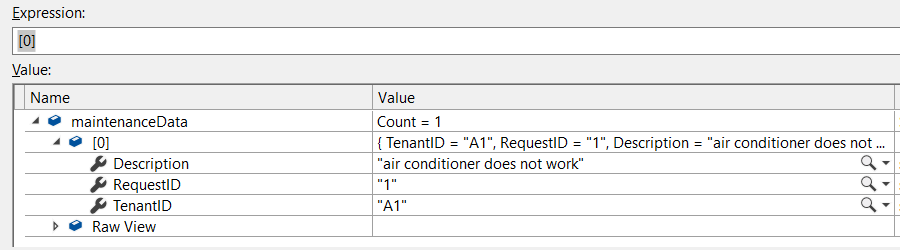
Here is the output of this LINQ query;

If we are going to add a new column in request table, for example AllowToEnterApt. We can use foreach loop to update the values in this column;

serviceRequest.Tables["request"].Columns.Add("AllowToEnterApt");
foreach (DataRow row in serviceRequest.Tables["request"].Rows)
{
     row["AllowToEnterApt"] = 1;
}

Remove single quote from strings

I would like to remove single quote from beginning and end of this string;

string tabName = "'i# milestones$'";
string outputTabName = tabName.Trim(new char[]{(char)39});

Where (char)39 represents ', and the .Trim() will remove the first and last ' from the string; You can try like this as well:

string outputTabName = tabName.Trim('\'');

Using Shared Projects in ASP.NET

Shared projects are used to facilitate cross platform development. This allows you to reference an entire project as opposed to just a single assembly.

Shared project is a shred bucket of code. At compile time, any project that reference the shared project will have all of the files (including folder structure) and then they will be compiled. You wouldn’t see any separate DLL as you might have seen in PCL (Portable class libraries).

A shared project is not going to be compiled on its own. The code in the shared project is incorporated into assembly that reference it and compiled within that assembly.

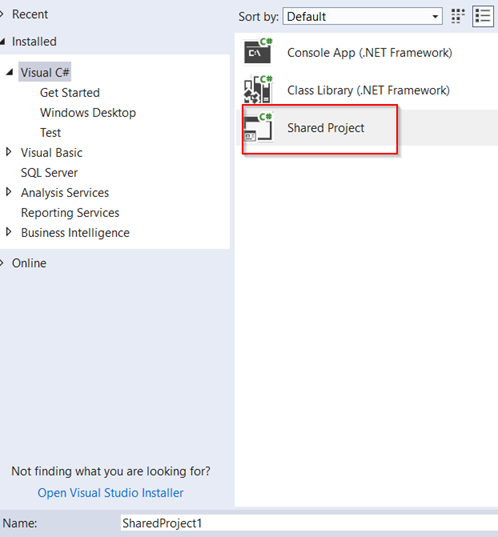
Let’s create a shared project;

Create a class Math with a static method Add.

namespace SharedProject1
{
    public class Math
    {
        public static int Add(int x, int y)
        {
#if NETCOREAPP1_1
            return (x + y) + 3;
#else
            return (x + y) + 13;
#endif
        }
    }
}

Add SharedProject reference to your project. If your project is targeting .NET Core 1.1, the relevant piece of code in #if/#endif will run.

//.NET Core 1.1
SharedProject1.Math.Add(3, 4);      //return 10

//.NET Core 1.0
SharedProject1.Math.Add(3, 4);      //return 20

Here is some recommendation of using Shared Projects and Portable Class Libraries;

How the code is reused

  1. Shared Projects: Source Code (All source code is available to your reference project)
  2. PCL: Reference is available at Assembly level (for example MyLibrary.dll)

Compile time behavior

  1. Shared Projects: All source code is copied into each referenced project and compiled there
  2. PCL: Nothing new. Its compiled as usuall.

Visual Studio support

  1. Shared Projects: Full Support
  2. PCL: Each plateform is compiled separately. This can be accomplished thru IOC.

#IFDEF Support

  1. Shared Projects: Full Support
  2. PCL: Unsupported

.NET Framework Support

  1. Shared Projects: Full Support
  2. PCL: Limited

The core problem with shared project is difficulty of code testing because of conditional compilation directives. This in turn introduce errors that you wouldn’t know until you have actually compiled your application.

Resources

https://dev.to/rionmonster/sharing-is-caring-using-shared-projects-in-aspnet-e17

https://stackoverflow.com/questions/30634753/what-is-the-difference-between-a-shared-project-and-a-class-library-in-visual-st

Throw exceptions in SQL and C#

This is how we can throw an exception in C#;

static void CopyObject(SampleClass original)
{
    if (original == null)
    {
        throw new System.ArgumentException("Parameter cannot be null", "original");
    }
}

This is how we can throw an exception in SQL;

BEGIN TRY
	SET NOCOUNT ON;

	SELECT 1/0;

END TRY  
BEGIN CATCH  
    --SELECT   
    --    ERROR_NUMBER() AS ErrorNumber  
    --    ,ERROR_SEVERITY() AS ErrorSeverity  
    --    ,ERROR_STATE() AS ErrorState  
    --    ,ERROR_PROCEDURE() AS ErrorProcedure  
    --    ,ERROR_LINE() AS ErrorLine  
    --    ,ERROR_MESSAGE() AS ErrorMessage;  
    THROW;
END CATCH;  

If you don’t want to throw exception, comment “THROW” keyword. This will stop propagating exception to calling method and “catch(SqlException ex)” block will never be able to see it.

Uncomment all other lines. You have to use data reader to get result back and handle exception manually.