Pass parameters to action method in ASP.NET Core

One of the simplest and easiest ways to pass parameters to an action method is passing it via the URL. The following code snippet illustrates how you can pass parameters in the URL.

[HttpGet]
[Route("Default/GetAuthor/{authorId:int}")]
public IActionResult GetAuthor(int authorId)
{
   var data = authorRepository.GetAuthor(authorId);
   return View(data);
}

The URL to the endpoint is:

GET: http://localhost:8061/Default/GetAuthor/1

Here are some of links;

https://www.infoworld.com/article/3568209/how-to-pass-parameters-to-action-methods-in-asp-net-core-mvc.html

Executing Raw SQL Queries using EF Core

Here are some methods;

DbSet.FromSqlRaw

The DbSet.FromSqlRaw method (DbSet.FromSql prior to Entity Framework Core 3.0) enables you to pass in a SQL command to be executed against the database to return instances of the type represented by the DbSet:

public class Book
{
    public int BookId { get; set; }
    public string Title { get; set; }
    public Author Author { get; set; }
    public int AuthorId{ get; set; }
    public string Isbn { get; set; }
}
...
public class SampleContext : DbContext
{
    public DbSet<Book> Books { get; set; }
}
using (var context = new SampleContext())
{
    var books = context.Books.FromSqlRaw("SELECT BookId, Title, AuthorId, Isbn FROM Books").ToList();
}

The DbSet must be included in the model (i.e. it can not be configured as Ignored). All columns in the target table that map to properties on the entity must be included in the SQL statement. The column names must match those that the properties are mapped to. Property names are not taken into account when the results are hydrated into instances of the entity.

If any columns are missing, or are returned with names not mapped to properties, an InvalidOperationException will be raised .

Parameterized Queries

It’s always advised to parameterize user input to prevent the possibility of a SQL injection attack being successful. Entity Framework Core will parameterize SQL if you use format strings with FromSqlRaw or string interpolation with the FromSqlInterpolated method:

// Format string
var author = db.Authors.FromSqlRaw("SELECT * From Authors Where AuthorId = {0}", id).FirstOrDefault();
// String interpolation
var author = db.Authors.FromSqlInterpolated($"SELECT * From Authors Where AuthorId = {id}").FirstOrDefault();

Both of these approaches result in the following SQL being generated;

SELECT "a"."AuthorId", "a"."FirstName", "a"."LastName"
FROM (
    SELECT * From Authors Where AuthorId = @p0
) AS "a"
LIMIT 1

Entity Framework Core will only parameterize format strings if they are supplied inline to the FromSqlRaw method call. Format strings declared outside of the FromSqlRaw method call will not be parsed for parameter placeholders. In effect, you will be passing a concatenated string directly to the database, which is a SQL injection risk.

The following example is dangerous and should not be used:

var sql = string.Format("SELECT * From Authors Where AuthorId = {0}", id);
var author = db.Authors.FromSqlRaw(sql).FirstOrDefault(); 

The generated SQL is unparameterized:

SELECT "a"."AuthorId", "a"."FirstName", "a"."LastName"
FROM (
  SELECT * From Authors Where AuthorId = 2
) AS "a"
LIMIT 1

Stored Procedures

The SQL command can be any valid SQL statement that returns all the required fields of data. It is possible to call stored procedures via the FromSqlRaw method:

using (var context = new SampleContext())
{
    var books = context.Books
        .FromSqlRaw("EXEC GetAllBooks")
        .ToList();
}

It is also possible to pass in values to named parameters:

using (var context = new SampleContext())
{
    var authorId = new SqlParameter("@AuthorId", 1);
    var books = context.Books
        .FromSqlRaw("EXEC GetBooksByAuthor @AuthorId" , authorId)
        .ToList();
}

Non-Entity Types and Projections

In versions of EF Core prior to 2.1, it is not possible to use the FromSqlRaw method to return a subset of properties (a projection) directly from the database. Using the Books DbSet above as an example, the following will not work:

using(var context = new SampleContext())
{
    var books = context.Books.FromSqlRaw("SELECT BookId, Title FROM Books").ToList();
}

You must project the result of the FromSqlRaw method call to return a subset of properties:

using(var context = new SampleContext())
{
    var books = context.Books
        .FromSql("SELECT * FROM Books")
        .Select(b => new {
            BookId = b.BookId,
            Title = b.Title 
            }).ToList();
}

However, this may prove inefficient as all columns from the mapped table will be returned by the FromSql method call.

Support for returning ad hoc (not DbSet) types from direct SQL calls is possible from EF Core 2.1.

Database.ExecuteSqlCommand

The DbContext exposes a Database property which includes a method called ExecuteSqlCommand. This method returns an integer specifying the number of rows affected by the SQL statement passed to it. Valid operations are INSERTUPDATE and DELETE. The method is not used for returning entities.

using(var context = new SampleContext())
{
    var commandText = "INSERT Categories (CategoryName) VALUES (@CategoryName)";
    var name = new SqlParameter("@CategoryName", "Test");
    context.Database.ExecuteSqlCommand(commandText, name);
}

Note: You will need to add using Microsoft.Data.SqlClient; to make the SqlParameter type available to your code.

The ExecuteSqlCommand method can also be used to execute stored procedures:

using(var context = new SampleContext())
{
    var name = new SqlParameter("@CategoryName", "Test");
    context.Database.ExecuteSqlCommand("EXEC AddCategory @CategoryName", name);
}

Leveraging ADO.NET via the Context.Database property

In addition to the ExecuteSqlCommand method, the DbContext.Database property provides an API that allows you to perform ADO.NET operations directly. The GetDbConnection method returns a DbConnection object representing the context’s underlying connection. From that point, you can revert to the familiar ADO.NET APIs:

using (var context = new SampleContext())
using (var command = context.Database.GetDbConnection().CreateCommand())
{
    command.CommandText = "SELECT * From Table1";
    context.Database.OpenConnection();
    using (var result = command.ExecuteReader())
    {
        // do something with result
    }
}

EF CORE..

Get file path in .net core from wwwroot folder

This is how;

public class HomeController : Controller {
    private IWebHostEnvironment _hostEnvironment;

    public HomeController(IWebHostEnvironment environment) {
        _hostEnvironment = environment;
    }

    [HttpGet]
    public IActionResult Get() {
        string path = Path.Combine(_hostEnvironment.WebRootPath, "Sample.PNG");
        return View();
    }
}

References

https://weblog.west-wind.com/posts/2020/Feb/26/Working-with-IWebHostEnvironment-and-IHostingEnvironment-in-dual-targeted-NET-Core-Projects#out-with-old-in-with-the-new-iwebhostenvironment

Decode JWT Token

Decoding JWT token and return value;

protected string GetCalimValue(string token)
{
   var handler = new JwtSecurityTokenHandler();
   var jsonToken = handler.ReadToken(token);
   var tokenJWT = jsonToken as JwtSecurityToken;
   //var jwtSecurityToken = handler.ReadJwtToken(token);

   var jti = tokenJWT.Claims.First(claim => claim.Type == "jti").Value;
   return jti;
}

Validating and Decoding JWT Token and return value;

protected string ValidateTokenAndGetClaimValue(string token)
{
    string secret = "this is a string used for encrypt and decrypt token";
    var key = Encoding.ASCII.GetBytes(secret);
    var handler = new JwtSecurityTokenHandler();
    var validations = new TokenValidationParameters
    {
        ValidateIssuerSigningKey = true,
        IssuerSigningKey = new SymmetricSecurityKey(key),
        ValidateIssuer = false,
        ValidateAudience = false
    };
    var claims = handler.ValidateToken(token, validations, out var tokenSecure);

    var tokenJWT = tokenSecure as JwtSecurityToken;
    var emailAddress = tokenJWT.Claims.First(claim => claim.Type == "email").Value;
    return emailAddress;
}

We want to keep token inside cookies on a successful token acquisition;

Response.Cookies.Append("X-Access-Token", login.JwToken, new CookieOptions() { HttpOnly = true, SameSite = SameSiteMode.Strict });
Response.Cookies.Append("X-Email", login.Email, new CookieOptions() { HttpOnly = true, SameSite = SameSiteMode.Strict });

References

https://stackoverflow.com/questions/38340078/how-to-decode-jwt-token

https://www.codemag.com/Article/2105051/Implementing-JWT-Authentication-in-ASP.NET-Core-5

JSON token with best practices

JSON Web Token (JWT) is a standard RFC 7519 for exchanging cryptographically signed JSON data. It is probably the most popular current standard of authorization on the web, especially when it comes to microservices and distributed architecture.

As a developer, when you are asked to implement a modern web application, you may need to break it down into independent services. Independent services and distributed architecture have many advantages. One thing that you will need to think about is how your services will know that users are allowed to use them.

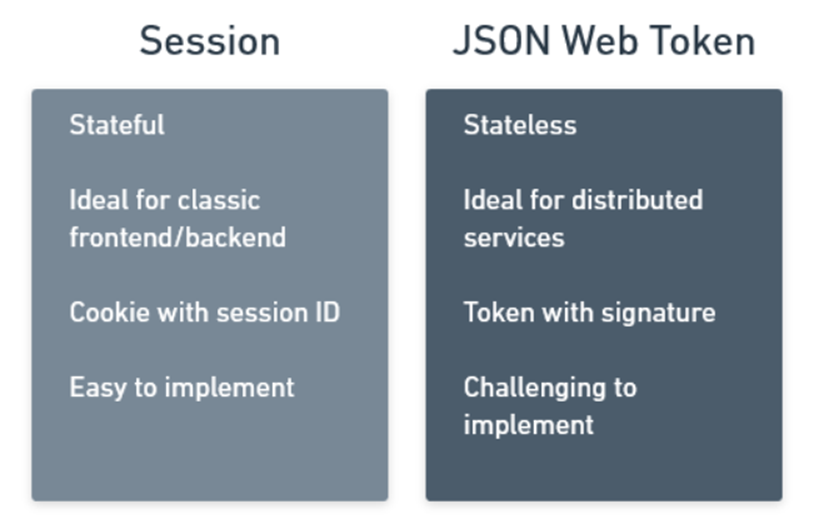
With stateful session management, your solution would be to create a user session that is shared among all parts of the system. But with a growing distributed system, sharing a session can be quite challenging.

The alternative to stateful session management is passing a stateless JSON Web Token which will represent an access token or an identity token. It will hold claims that allow your services to authorize their users and it will use the magic of cryptography to ensure that the token is authentic and has not been tampered with.

This way your services don’t need to share a stateful session, they only need to trust the token that they are given.

Standard Sessions

If you have been around for a while like me, you know that the standard approach on the web has been the use of session and session-based cookies.

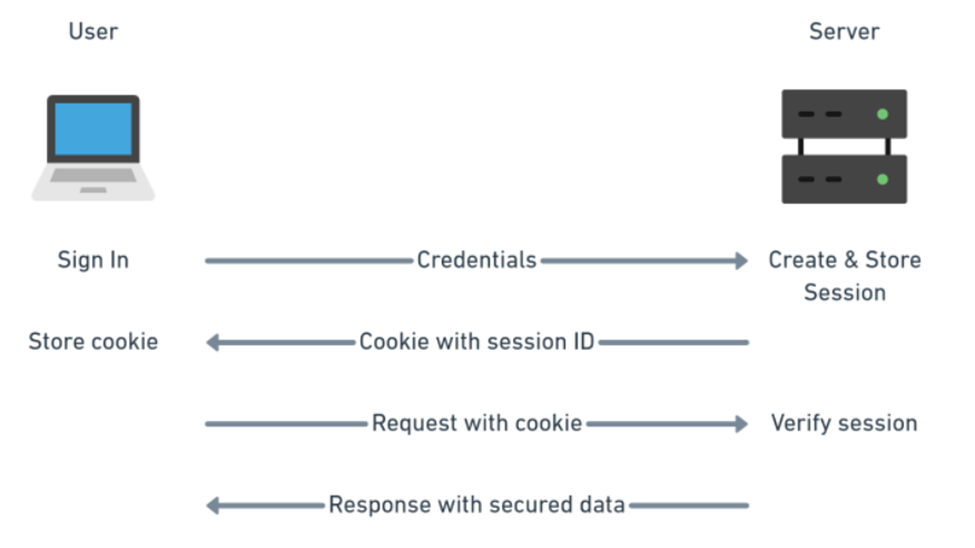
Users would sign in with their credentials and the server would give them back a cookie with their session ID. That cookie is then sent by the user with every request to authorize the user.

Nowadays that process is so automated that you barely need to write any code to support it and browsers know to automatically send the session cookie with every request themselves. it is super convenient.

The above diagram should feel fairly familiar and simple and it is what websites have been doing for a long time.

For a simple website, it is far easier to implement standard session management which is well supported by libraries on the server, and cookie management in the browser.

What is JWT?

JWT is simply a signed JSON intended to be shared between two parties. The signature is used to verify the authenticity of the token to make sure that none of the JSON data were tampered with. The data of the token themselves are not encrypted.

The method of authenticating users does not change with JWT. You can still use a user name and password (although you should use something more secure like two-factor authentication or DID Auth). The difference is only in how you manage the user authorization (how you let your service know that the user has permission to do something).

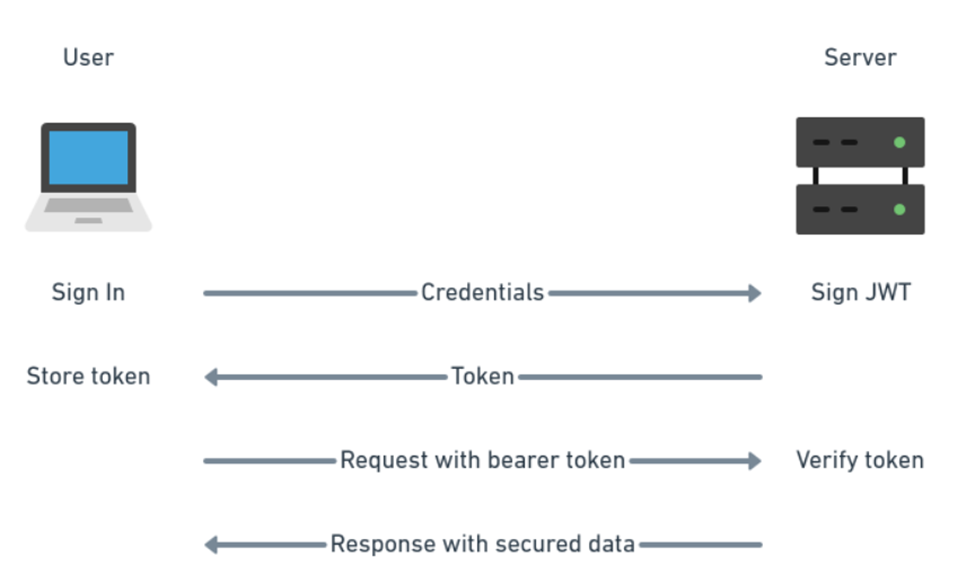
On the server, you verify the token signature and get access to the JSON data directly which is much simpler for distributed architectures.

In your web application frontend, your code needs to manage how the token is stored in the browser (cookie, session storage, or local storage) and how it is passed with requests to the server (as authorization bearer header).

If you compare the diagrams for session-based authorization and JWT, you will notice that the principle is very similar. The main reason for using JWT is for the client-server communication to remain stateless.

JWT gained popularity because statelessness made it easier to design independent services without having to deal with shared session management.

Where to store the JWT token in the browser?

You have three options here really. You either use cookies, web storage, or in memory. The most commonly used option seems to be local storage.

JWT in a cookie

Cookies have the advantage that they are automatically sent together with each request so you don’t need to deal with the authorization header.

Cookies are still open to Cross-Site Request Forgery (CSRF)attacks because of which you should also implement CSRF tokens. CSRF token is a random string sent as a cookie with each request and it is different for each request.

You should also use httpOnly flag to make the cookie available only server-side. A cookie with the HttpOnly attribute is inaccessible to the JavaScript document.cookie API; it is sent only to the server.

A cookie with the Secure attribute is sent to the server only with an encrypted request over the HTTPS protocol (however, on localhost only, you can still use HTTP).

JWT in web storage: Local storage vs session storage

The difference between these two is that local storage is more permanent. Session storage is cleared when the user closes the website window. Local storage data have to be explicitly deleted.

Unlike cookies, local storage is sandboxed to a specific domain and its data cannot be accessed by any other domain including sub-domains. But remember that you are still vulnerable to Cross-Site Scripting (XSS). Both cookie and web storage solutions are vulnerable to XSS.

Local storage is used the most in JWT implementations. However, session storage is the more secure option here.

With localStorage JWT is not passed with each request automatically, and you need to pass it to the server through an authorization header yourself.

JWT in memory

The most secured solution here is to store JWT in memory of your single-page application. This means that you end up storing the token in a variable in JavaScript without additional persistence.

This comes with some limitations. You cannot implement a single-sign-on (SSO) and each tab or open window in a browser will require its own sign-in because JavaScript memory is not shared. However, the sharing issue can be worked around by the use of a refresh token.

This solution is of course still vulnerable to Cross-Site Scripting like all the other solutions.

If you are building a standard frontend/backend website, use standard session management. If you are building distributed system with services, implement JWT authorization.

References

https://betterprogramming.pub/jwt-ultimate-how-to-guide-with-best-practices-in-javascript-f7ba4c48dfbd