Web Apps Performance Testing

Here are some of the tools that can be used to do web application performance testing;

WebLOAD
LoadNinja
HeadSpin
ReadyAPI Performance
LoadView
PFLB
Keysight’s Eggplant
Apache JMeter
LoadRunner
Rational Performance Tester
NeoLoad
LoadComplete
WAPT
Loadster
k6
Testing Anywhere
Appvance
StormForge

What about Databases?

SQL queries in SSMS runs faster but they are slower in .NET application. One of the reason could be ARTHIABORT setting, read article below;

https://blog.sqlauthority.com/2018/08/07/sql-server-setting-arithabort-on-for-all-connecting-net-applications/

References

https://liferay.dev/blogs/-/blogs/session-storage-is-evil

C# list to anonymous type with new properties

This is my expected anonymous type out of a list object;

var roleData = new[] {
    new { roleName = "Office Director"},
    new { roleName = "Manager Operations"},
    new { roleName = "Training Manager" }
};

This is how we can create anonymous type out of a strongly typed C# list;

foreach (UserLocation location in request.RoleRequest.UserLocations)
{
   ....................
   var rolesData = location.Roles
               .Select(x => new { roleName = x.RoleName }).ToArray();  
}

For more examples, continue on Stack Overflow

URL Matching in C#

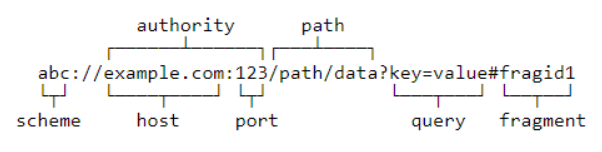
To start, let’s define what the internals of a URL looks like:

For our purposes, we care about the scheme, authority, path, query, and fragment. You can think of the scheme as the protocol, i.e., HTTP or HTTPS. The authority is the root or domain, for example, mycompany.com. The path, query, and fragment make up the rest of the URL. The URL spec defines each segment in this specific order. For example, the scheme always comes before the authority. The path comes after the scheme and authority. The query and fragment come after the path if there is one in the URL.

Read this, if thinking about using fragment in URL.

Alice runs a web site, Bob visits it, authenticates and receives a session cookie. (Some time might pass here, Bob might even close his browser.) Charlie sends Bob a mail saying “check out this cool link!”. Bob opens the link, which leads to a site controlled by Charlie. The page redirects Bob’s browser to a page on Alice’s site with an attack payload in the hash. The payload is executed, and since the browser still remembers the cookies, it can just send them to Charlie

https://stackoverflow.com/questions/1822598/getting-url-hash-location-and-using-it-in-jquery

Read more here

Using appsettings.json in Asp.net core 6 Program.cs file

In case that we have in appsettings;

"settings": {
    "url": "myurl",
    "username": "guest",
    "password": "guest"
  }

and we have the class;

public class Settings
    {
        public string Url { get; set; }
        public string Username { get; set; }
        public string Password { get; set; }
    }

we can use also;

var settings = builder.Configuration.GetSection("Settings").Get<Settings>();

var url = settings.Url;

Reference

https://stackoverflow.com/questions/69390676/how-to-use-appsettings-json-in-asp-net-core-6-program-cs-file