The Modern .NET Developer in 2026: From Code Writer to System Builder

There was a time when being a .NET developer mostly meant writing solid C# code, building APIs, and shipping features. If the application worked and the database queries were fast enough, the job was done.

That world is gone.

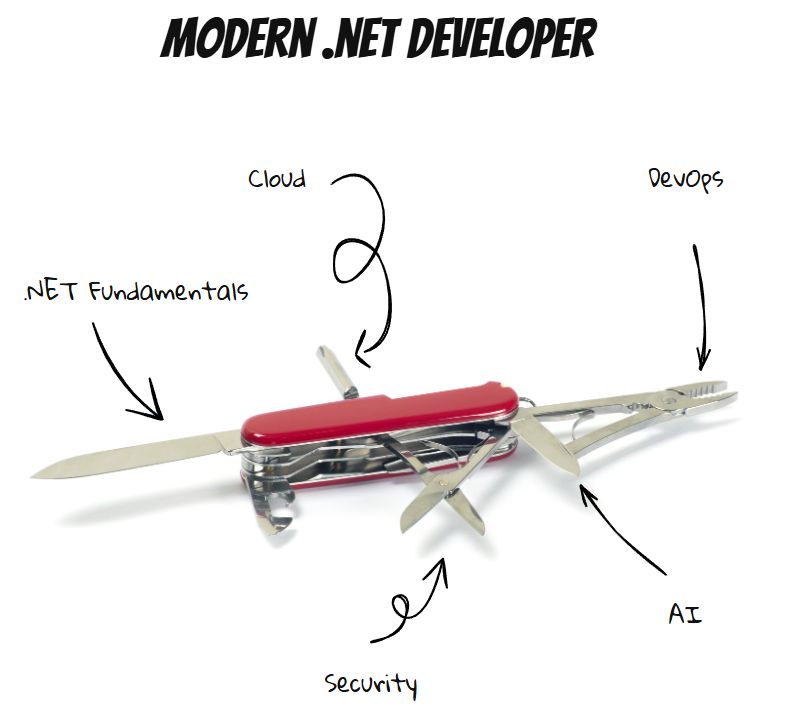
In 2026, a modern .NET developer isn’t just a coder. They’re a system builder, balancing application development, cloud architecture, DevOps, security, and increasingly, AI-driven decisions.

One Feature, Many Disciplines

Consider a typical modern feature:

  • A scheduled job populates data into a database.
  • That data feeds reporting tools like Power BI.
  • Deployment pipelines push updates across environments worldwide.
  • Cloud services scale automatically under load.
  • Monitoring and security controls are part of the delivery.

One feature now touches multiple domains. Delivering it requires understanding infrastructure, automation, data, deployment, and operations—not just application logic.

The scope of the role has expanded dramatically.

Fundamentals Still Matter

Despite all the change, the core skills haven’t disappeared.

Developers still need to:

  • Build REST APIs that handle real-world load
  • Write efficient Entity Framework queries
  • Understand async/await and concurrency
  • Maintain clean, maintainable codebases

Bad fundamentals still break systems, regardless of how modern the infrastructure is.

But fundamentals alone are no longer enough.

Cloud Decisions Are Now Developer Decisions

In many teams, developers now influence—or directly make—architecture decisions:

  • Should this workload run in App Service, Containers, or Functions?
  • Should data live in SQL Server or Cosmos DB?
  • Do we need messaging via Service Bus or event-driven patterns?

These choices affect cost, scalability, reliability, and operational complexity. Developers increasingly need architectural awareness, not just coding ability.

DevOps Is Part of the Job

Deployment is no longer someone else’s responsibility.

Modern developers are expected to:

  • Build CI/CD pipelines that deploy automatically
  • Containerize services using Docker
  • Ensure logs, metrics, and monitoring are available
  • Support production reliability

The boundary between development and operations has largely disappeared.

Security Is Developer-Owned

Security has shifted left.

Developers now regularly deal with:

  • OAuth and identity flows
  • Microsoft Entra ID integration
  • Secure data handling
  • API protection and access control

Security mistakes are expensive, and modern developers are expected to understand the implications of their implementations.

AI Changes How We Work

Another shift is happening quietly.

In the past, developers searched for how to implement something. Today, AI tools increasingly help answer higher-level questions:

  • What are the long-term tradeoffs of this architecture?
  • How will this scale?
  • What operational risks am I introducing?

The developer’s role moves from solving isolated technical problems to designing sustainable systems.

From Specialist to Swiss Army Knife

The modern .NET developer is no longer just a backend specialist. They are expected to be adaptable:

  • Application developer
  • Cloud architect
  • DevOps contributor
  • Security implementer
  • Systems thinker

Not every developer must master every area—but awareness across domains is increasingly required.

The New Reality

The job has evolved from writing features to building systems.

And while that can feel overwhelming, it’s also exciting. Developers now influence architecture, scalability, reliability, and user experience at a system-wide level.

The industry hasn’t just changed what we build.

It’s changed what it means to be a developer.

And in 2026, being versatile isn’t optional—it’s the job.

IDesign Method: An Overview

Software projects often start small and cute, but can quickly become unmanageable as requirements change. This transformation is usually due to the lack of an appropriate architecture, or an architecture that is not designed for future change.

The IDesign Method: An Overview
The IDesign method, developed by Juval Löwy, provides a systematic approach to creating a software architecture that will stand the test of time. Let’s explore its key principles.

Avoid functional decomposition
The first principle of IDesign is to avoid functional decomposition – the practice of translating requirements directly into services. For example, if you’re building an e-commerce platform, don’t create separate services for “user management”, “product catalogue” and “order processing” just because those are your main requirements. Instead, IDesign advocates a more thoughtful approach based on volatility.

Volatility based decomposition
IDesign focuses on identifying areas of volatility – aspects of the system that are likely to change over time. For example, in our e-commerce example, payment methods might be an area of volatility, as you may need to add new payment options in the future.

The three-step process:
Identify 3-5 core use cases
What your system does at its most basic level. For our e-commerce platform, these might be:

Browse and search for products
Manage shopping cart
Completing a purchase

Identify areas of volatility
Identify aspects of the system that are likely to change. In our e-commerce example:
Payment methods
Shipping options
Product recommendation algorithms

Define services
IDesign defines five types of services:
Client: Handles user interaction (e.g. web interface)
Manager: Orchestrates business use cases
Engine: Executes specific business logic
Resource Access: Handles data storage and retrieval
Utility: Provides cross-cutting functionality

For our e-commerce platform example we might have:

A ShoppingManager – to orchestrate the shopping process
A PaymentEngine – to handle different payment methods
A ProductCatalogAccess – to manage product data

Design Principles and Patterns

Great software is not written.
It’s designed.

Most systems don’t fail because of bad developers.
They fail because of bad design decisions made early — and scaled blindly.

This is the foundation every serious engineer and tech leader must master 👇

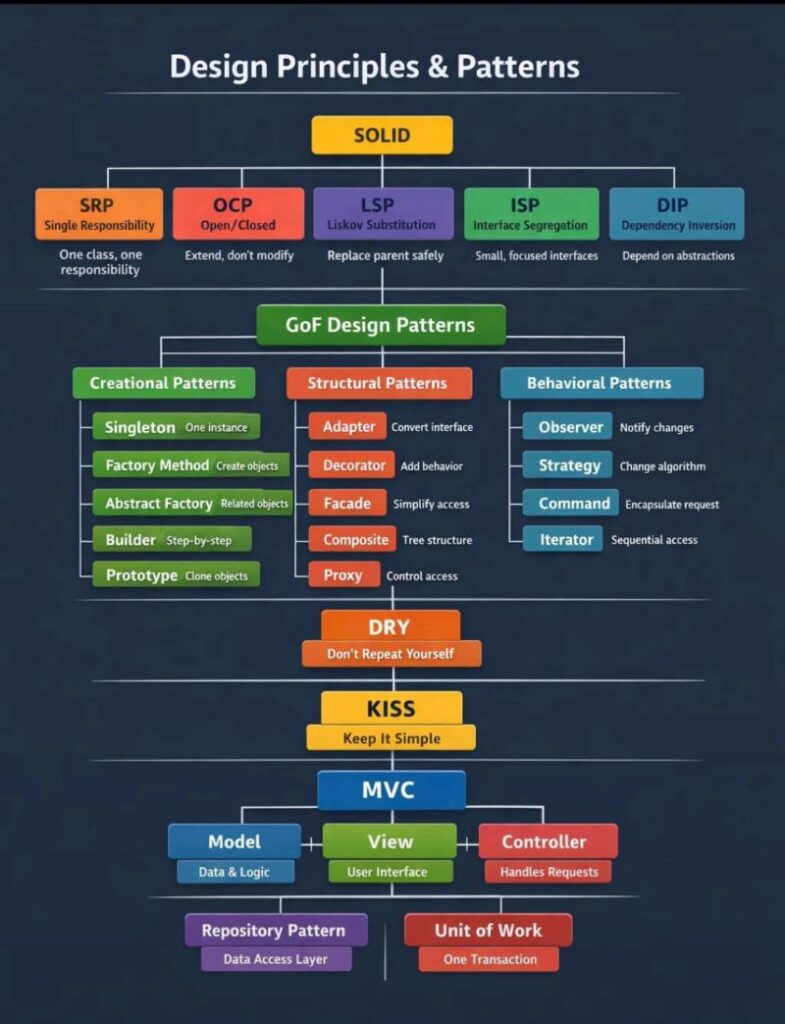
Design Principles & Patterns

🔹 SOLID

SRP – One class, one reason to change
OCP – Extend, don’t modify
LSP – Substitutions must be safe
ISP – Small, focused interfaces
DIP – Depend on abstractions, not concretes

SOLID isn’t theory. It’s how you avoid rewriting your system every 6 months.

🔹 GoF Design Patterns

1) Creational → Control how objects are created (Factory, Builder, Singleton)
2) Structural → Control how objects are composed (Adapter, Facade, Proxy)
3) Behavioral → Control how objects communicate (Strategy, Observer, Command)

Patterns are not “fancy code.”
They are battle-tested solutions to recurring problems.

🔹 DRY – Don’t Repeat Yourself
Duplication is a silent killer.
It multiplies bugs and slows teams.

🔹 KISS – Keep It Simple
Complexity is not intelligence.
Simplicity is.

🔹 MVC + Repository + Unit of Work
Clean separation of concerns.
Predictable codebases.
Scalable teams.

Reality check:

Frameworks change.
Languages change.
Trends change.

Principles don’t.

If you want to build:

Systems that scale
Teams that move fast
Products that survive years

Master the fundamentals.

Everything else is noise.

Natural Language AI-Powered Smart UI

Looking for real-world AI examples is a challenge and part of this challenge comes from Generative AI (GenAI) news dominating the media. It feels like every AI demo involves chatting with GenAI to produce content. The obligatory chat completion demo has started to become the to-do list of AI demo apps, and, to make matters worse, it’s selling AI short. GenAIs rely on large language models (LLMs), which are the brain behind natural language processing tasks. In this article, I’ll explore the opportunities presented by LLMs using a real-world research-and-development experiment. This experiment is part of on-going research into AI-enabled user interface components (aka .NET Smart Components) by Progress Software and Microsoft.

Read more on code site

How to run SonarQube Analysis in Visual Studio Console

To generate a SonarQube token (required for authentication when running analyses from the command line or CI/CD pipelines), follow these steps:


Steps to Generate a SonarQube Token

  1. Log in to your SonarQube server (e.g., http://localhost:9000 for local setups).
  2. Click your profile icon (top-right corner) → “My Account”.
  3. Go to the “Security” tab.
  4. Under “Tokens”, enter a name for your token (e.g., vs-console-token).
  5. Click “Generate”.
  6. Copy the token immediately (it won’t be shown again!).
    Example token format: sqp_1234567890abcdef

How to Use the Token

  • In dotnet-sonarscanner commands, pass the token via:shCopyDownloaddotnet sonarscanner begin /k:”your-project-key” /d:sonar.host.url=”http://localhost:9000″ /d:sonar.login=”sqp_1234567890abcdef”
  • For security, never hardcode the token in scripts. Use:
    • Environment variables (e.g., SONAR_TOKEN).
    • Secret management tools (e.g., Azure Key Vault, GitHub Secrets).

Important Notes

  • 🔒 Treat tokens like passwords (they grant access to your SonarQube projects).
  • 🔄 Regenerate tokens periodically or revoke old ones (under “Security”).
  • 🚫 No token? You’ll get errors like Not authorized or Authentication failed.

Example Workflow

# Set token as an environment variable (optional)
set SONAR_TOKEN=sqp_1234567890abcdef

# Run analysis (Windows CMD)
dotnet sonarscanner begin /k:"my-project" /d:sonar.host.url="http://localhost:9000" /d:sonar.login="%SONAR_TOKEN%"
dotnet build
dotnet sonarscanner end /d:sonar.login="%SONAR_TOKEN%"

Get the SonarQube Project URL

The project URL is the web address of your project in SonarQube. It typically follows this format:

http://<sonarqube-server-url>/dashboard?id=<project-key>
  • <sonarqube-server-url>: The host where SonarQube is running (e.g., http://localhost:9000 if running locally).
  • <project-key>: The unique key assigned to your project in SonarQube.

How to Find the Project Key?

  1. Log in to your SonarQube server.
  2. Navigate to your project.
  3. Check the URL in the browser’s address bar (e.g., http://localhost:9000/dashboard?id=my-project-key).
  4. Alternatively, go to Project Settings → General Settings → Key.

2. Run SonarQube Analysis in Visual Studio Console

To analyze a .NET project in Visual Studio Developer Command Prompt (or terminal), use the SonarScanner for .NET (dotnet-sonarscanner).

Prerequisites

  • Install Java (required for SonarQube scanner).
  • Install SonarScanner for .NET:shCopyDownloaddotnet tool install –global dotnet-sonarscanner

Steps to Run Analysis

  1. Start the SonarQube Analysis:shCopyDownloaddotnet sonarscanner begin /k:”” /d:sonar.host.url=”” /d:sonar.login=”
    • Replace:
      • <project-key> with your SonarQube project key.
      • <sonarqube-server-url> with your SonarQube server URL (e.g., http://localhost:9000).
      • <token> with a SonarQube user token.
  2. Build Your Project:shCopyDownloaddotnet build
  3. Complete & Publish Results to SonarQube:shCopyDownloaddotnet sonarscanner end /d:sonar.login=”<token>”
  4. Check Results:
    • Open the SonarQube project URL (e.g., http://localhost:9000/dashboard?id=my-project-key) in a browser.

Example

# Start analysis
dotnet sonarscanner begin /k:"my-dotnet-app" /d:sonar.host.url="http://localhost:9000" /d:sonar.login="sqp_1234567890abcdef"

# Build the project
dotnet build

# End analysis & upload results
dotnet sonarscanner end /d:sonar.login="sqp_1234567890abcdef"

After running these commands, your analysis results will appear in the SonarQube dashboard.