Proxmox alert configuration via gmail

A short list to configure Proxmox VE to send alert using Gmail account;

#--------- Proxmox email configuration -------------

# Install authentication libraries
apt-get install libsasl2-modules

Configure app passwords on your Google account

https://myaccount.google.com/apppasswords

# Configure postfix
echo "smtp.gmail.com <youremail>@gmail.com:<app-password>"> /etc/postfix/sasl_passwd

# update permissions
chmod 600 /etc/postfix/sasl_passwd

# hash the file
postmap hash:/etc/postfix/sasl_passwd


# check to to be sure the db file was create
cat /etc/postfix/sasl_passwd.db

# edit postfix config
nano /etc/postfix/main.cf

# google mail configuration

relayhost = smtp.gmail.com:587
smtp_use_tls = yes
smtp_sasl_auth_enable = yes
smtp_sasl_security_options =
smtp_sasl_password_maps = hash:/etc/postfix/sasl_passwd
smtp_tls_CAfile = /etc/ssl/certs/Entrust_Root_Certification_Authority.pem
smtp_tls_session_cache_database = btree:/var/lib/postfix/smtp_tls_session_cache
smtp_tls_session_cache_timeout = 3600s

# reload postfix
postfix reload

# send a test emails
echo "This is a test message sent from postfix on my Proxmox Server" | mail -s "Test Email from Proxmox" <your-email>@gmail.com
date | mail -s “test” <your-email>@gmail.com

# Now, fix from name in email

# install dependency
apt update
apt install postfix-pcre

# edit config
nano /etc/postfix/smtp_header_checks

# add the following text
/^From:.*/ REPLACE From: pvetower-alert pvetower-alert@<your-email>.com

# hash the file
postmap hash:/etc/postfix/smtp_header_checks

# check the contents of the file
cat /etc/postfix/smtp_header_checks.db

# add the module to our postfix config
nano /etc/postfix/main.cf

# add to the end of the file
smtp_header_checks = pcre:/etc/postfix/smtp_header_checks

# reload postfix service
postfix reload


# send a test emails
date | mail -s “test” <your-email>@gmail.com

--done

References

# steps reference list;
https://docs.technotim.live/posts/proxmox-alerts/
https://forum.proxmox.com/threads/proxmox-setup-for-gmail.13405/

How To Update Raspberry Pi

Start by updating the list of repository packages:

sudo apt update

When this is done, run the update command:

sudo apt dist-upgrade

Follow any instructions and wait for the Pi update. When you’re done, type in:

sudo apt clean

This will delete unnecessary files that were uploaded during the update. Finish by restarting:

sudo reboot

When your Raspberry Pi is restarted, you will use the latest version of Raspbian.

For more info, read here

Hosting application targeting multiple framework

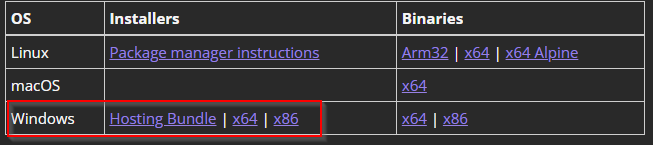
If the application is targeting multiple frameworks e.g. NET Core 2.1 and .NET Framework 4.6.1, you will need to install Hosting Bundle for it. Here is how;

https://dotnet.microsoft.com/en-us/download/dotnet/2.1

Restart your IIS box.

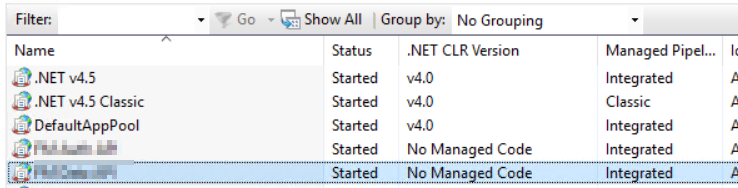
Make sure App poll is using v4.0 of .NET CLR version.

This will also help to solve this error;

IIS: Handler “aspNetCore” has a bad module “AspNetCoreModuleV2” in its module list

Version of .Net Framework, IIS App Pool is using?

.Net Framework 4.5 was installed on my machine and on the IIS Application Pool, I set the .NET CLR version to 4.0.

The AppPool’s .NET CLR Version is different from the .NET Framework Version.

The AppPool’s .NET CLR Version is different from the .NET Framework Version.

The .NET CLR Version 4.0 is the CLR base for the following .NET Framework Versions:

  • 4
  • 4.5 (including 4.5.1 and 4.5.2)
  • 4.6 (including 4.6.1 and 4.6.2 Preview)

So having a .NET CLR Version of 4.0 just means you support the above Frameworks, which will run under their deployed framework version.

Source: https://learn.microsoft.com/en-us/dotnet/standard/clr#clr-versions

Here is a full mapping of CLR to .NET Framework versions, based off this official documentation. https://learn.microsoft.com/en-us/dotnet/framework/migration-guide/versions-and-dependencies#version-information

CLR 1.0

.NET Framework 1.0


CLR 1.1

.NET Framework 1.1


CLR 2.0

.NET Framework 2.0

.NET Framework 3.0

.NET Framework 3.5


CLR 4

.NET Framework 4

.NET Framework 4.5

.NET Framework 4.5.1

.NET Framework 4.5.2

.NET Framework 4.6

.NET Framework 4.6.1

.NET Framework 4.6.2

.NET Framework 4.7

.NET Framework 4.7.1

.NET Framework 4.7.2

.NET Framework 4.8

Reference

https://stackoverflow.com/questions/37952860/which-version-of-the-net-framework-is-iis-using-for-my-apppool

Calculate your household energy usage in kWh

You need to know the wattage and electric rate per kWh. For me the electric rate is (13 cents) .13 per kWh. Let’s find out how to get wattage.

How can I find the wattage of a device?

Most devices have a label listing how many watts they use. You can find this wattage label either on the device (usually on the bottom or back) or in the owner’s manual.

Here is a list that shows the common wattage of everyday household devices. Though the wattage of your particular device may vary, it should give you a rough estimate.

Coffee Maker900-1200 watts
Toaster800-1400 watts
Iron100-1800 watts
Ceiling fan65-175 watts
Space heater (40gal)4500-5500 watts
Hair dryer1200-1875 watts
Laptop50 watts
Computer monitor150 watts
Computer tower120 watts
Television 19″-36″65-133 watts
Television 53″-61″170 watts
How to calculate kWh usage

To calculate your energy consumption, you’ll need to multiply an appliance’s wattage by the number of hours you use it in a day. That will give you the number of watt-hours consumed each day.

Calculate watt-hours per day

Device Wattage (watts) x Hours Used Per Day = Watt-hours (Wh) per Day
Example: A 125-watt television used three hours per day
125 watts x 3 hours = 375 Wh/Day

How many watts are in a kilowatt?

Your electricity bill is measured in kilowatt-hours (kWh), not watt-hours. One kilowatt is equal to 1,000 watts. To calculate how many kWh a device uses, divide the watt-hours from the previous step by 1,000.

Convert watt-hours to kilowatts

Device Usage (Wh) / 1000 (Wh/kWh) = Device Usage in kWh
Example: A television using 375 Wh of electricity per day
375 / 1000 = 0.375 kWh

Now that we know how many kWh the appliance uses per day, we can estimate that usage over a month. Let’s multiply by 30 days to simulate an average month.

Find your monthly energy usage

Daily Usage (kWh) x 30 (Days) = Approximate Monthly Usage (kWh/Month)
Example: A television using 0.375 kWh of electricity per day
0.375 kWh x 30 Days = 11.25 kWh/Month

In this example, a 125-watt television you use for three hours per day adds up to 11.25 kWh of energy per month. That is your television’s energy consumption.

To determine how much your appliances cost per month, multiply your electric rate by the estimated monthly usage from the steps above.

How much do appliances cost on my energy bills?

Monthly Usage (kWh) x Electric Rate ($/kWh) = Approximate Cost per Month
Example: A television using 11.25 kWh/Month with an electric rate of 10 cents per kWh ($0.10/kWh)
11.25 kWh x $0.10 = $1.13/Month

Based on these calculations, this television would cost you $1.13 per month. While that might not seem like much, the appliances and devices throughout your home will add up during a full month.

Your UPS would be another source of getting wattage. UPS will show the wattage number of all the devices that are connected. You can use that number to calculate your spending.

Reference

https://www.saveonenergy.com/resources/energy-consumption/