
Would you like to build video chat application using WebRTC. Read this what the challenges could be;
Tag: Labs / Experiments
What If Report Phishing is Missing in outlook?
- Go to the File tab.
- Select Options.
- In the Outlook Options dialog box, select the Add-ins tab.
- In the Inactive Applications list, select Microsoft Junk Email Reporting Add-in.
- Select the Manage dropdown arrow, choose Com Add-ins, then select Go.
If you don’t find this Add-in. Download from here;
https://www.microsoft.com/en-us/download/details.aspx?id=18275
Check your outlook is 32/64 bit and download add-in. go through wizard.
My Blogger Site
I have switched from blogger to word press. here is my blogger site;
Introduction to stocks, housing market
Check this web site;
use any stock symbol, aal, ual, aal, msft, amd, mu, spce, astr, mnts, arkx and see whether its available for sale or on hold. do a research on google and see last 5 years history. see Mkt capital and P/E (< 30). Example of overpriced stocks, Tesla.
Check Business and Science & Technology News (Google, Facebook). Dr. Shahid Massod is another resource for international stocks.
Apple, Microsoft stocks are safe. TX deals in precious metal and they are new but risky. Other options are 401K, IRA. Age over 50 can contribute more. Check fidelity also.
Check housing market. when fed interest rate increases, housing price fell. it’s time to invest. when fed interest decrease, refinance helps.
Create kids brokerage accounts in Charles Schwab or Fidelity. Buy big companies share. Big company is at least more than 50B. Look at last 5 years stock price. for example, if share price were $100 5 years ago and now it’s $500 then it’s 500% growth. Good company to invest.
Student Loan’s cost about 4-6%. grab load and invest in stocks that yield about 15%. Offset loan amount with invested amount and keep the gain.
Try to do job on 1099 or Corp-to-corp. Employer do not need to worry about social security and Medicare. The rate difference is around $8-10. This can help to save for old age.
Check and change PHP version in Azure WordPress App service
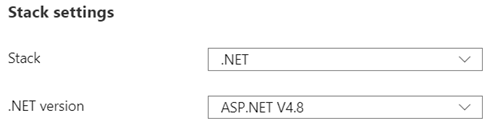
I am running WordPress as Azure App service. My current configuration for the technology stack is;
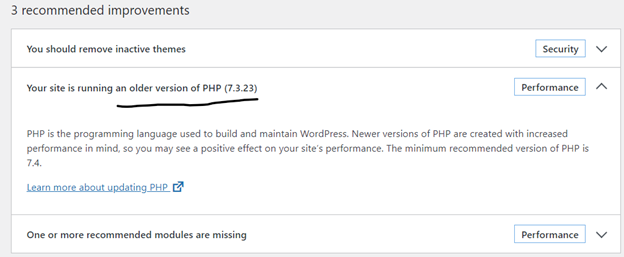
I did a Site health check on WordPress dashboard; Tools->Site Health, WordPress site health status shows that I am running an older version of PHP.
I figured I should be changing my Stack settings from .NET to PHP. I made the change hoping it wouldn’t break the application;
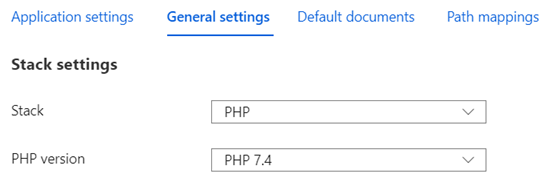
Technology stack is changed from .NET to PHP without any issues.
I went back to WordPress dashboard and ran Site Health. PHP version issue solved.
If someone is running WordPress on Linux, this is a good reference;