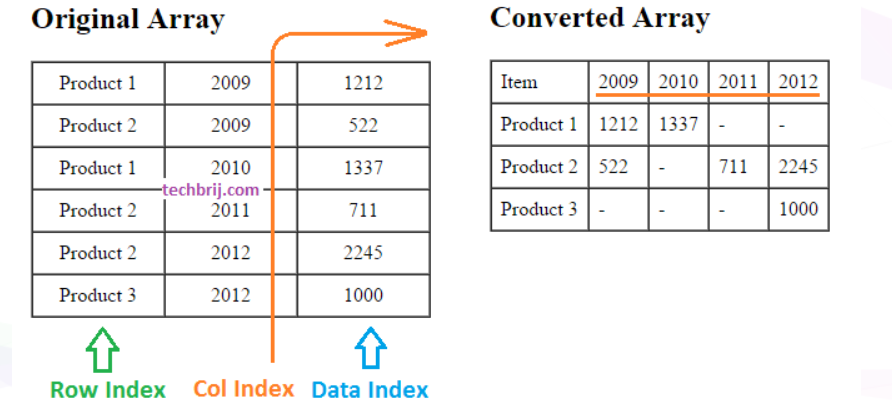
Sometimes we need to convert a column to row in JavaScript array. It might be helpful to pass it as web service argument, generating chart dynamically or to display data in more meaningful way. In this post, we will create a method which converts a specified column to row in JavaScript array like below:
function getPivotArray(dataArray, rowIndex, colIndex, dataIndex) {
        //Code from https://techbrij.com
        var result = {}, ret = [];
        var newCols = [];
        for (var i = 0; i < dataArray.length; i++) {

            if (!result[dataArray[i][rowIndex]]) {
                result[dataArray[i][rowIndex]] = {};
            }
            result[dataArray[i][rowIndex]][dataArray[i][colIndex]] = dataArray[i][dataIndex];

            //To get column names
            if (newCols.indexOf(dataArray[i][colIndex]) == -1) {
                newCols.push(dataArray[i][colIndex]);
            }
        }

        newCols.sort();
        var item = [];

        //Add Header Row
        item.push('Item');
        item.push.apply(item, newCols);
        ret.push(item);

        //Add content
        for (var key in result) {
            item = [];
            item.push(key);
            for (var i = 0; i < newCols.length; i++) {
                item.push(result[key][newCols[i]] || "-");
            }
            ret.push(item);
        }
        return ret;
    }
In above method: dataArray: Array to be converted rowIndex: Index of column in array which is to be kept as first column colIndex: Index of column whose values to be converted as columns in the output array. dataIndex: Index of column whose values to be used as data (displayed in tabular/grid format).
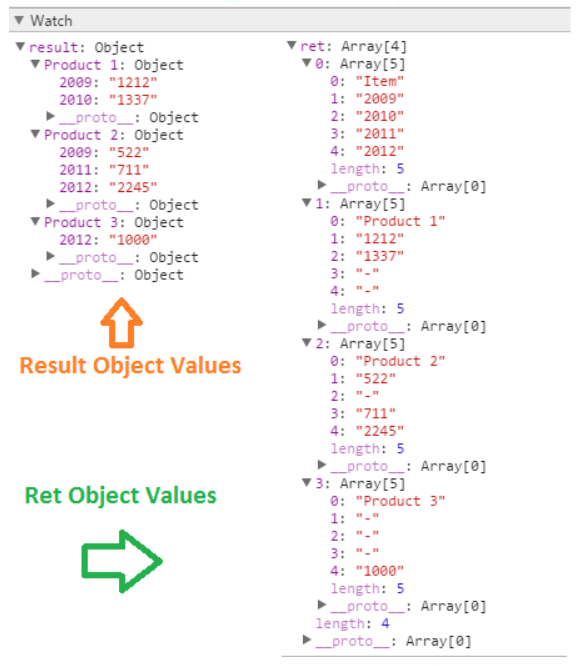
The logic of method is simple. First it iterates the given array and create a result object of [rowIndex],[colIndex] = [dataIndex] format so that it can be fetched easily by using associative array like syntax. In the same iteration, we put unique values of colIndex in newCols array which will be used to create new columns. After this loop, we will get result object and newCols array. Now create a return array (ret), push newCols values for Header data and iterate result object, push values in ret object. Finally, ret variable will have the converted array.
Use this function to show HTML table;
function arrayToHTMLTable(myArray) {
           var result = "<table border='1' cellpadding='7' cellspacing='0'>";
           for (var i = 0; i < myArray.length; i++) {
               result += "<tr>";
               for (var j = 0; j < myArray[i].length; j++) {
                   result += "<td>" + myArray[i][j] + "</td>";
               }
               result += "</tr>";
           }
           result += "</table>";

           return result;
       }
Most of the existing tree views used to crash my browser, they are making the naive mistake to load all the nodes in one shot. The simple solution was to load the nodes on demand, and when you open a node with thousands of children, and then you open another node which again has thousands of children, it is better to close the previous node and let go all their children than crash the browser.