
A good read. Below is the link;
https://microsoft.github.io/code-with-engineering-playbook/code-reviews/
All about code tracking and management for example, Azure DevOPS branching and merging, Release management, Continuous integration (CI) and Continuous deployment (CD).
A good read. Below is the link;
https://microsoft.github.io/code-with-engineering-playbook/code-reviews/
When someone seems to have it all together, just remember;


Behind every one of us, there’s a mess other’s can see.
Happy designing and coding…
It’s very simple. On windows 11, go to the root of project. Click on three horizontal dots and pick Options.
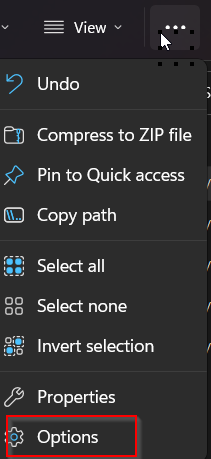
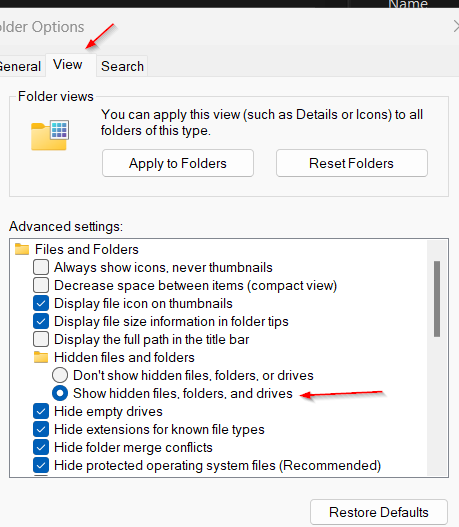
Click View under folder option and select “Show hidden files, folders, and drives”.
Remove all folder starts with .git or .vs.

The job is done.
To manage work, we need to create folders inside Branches. The key folders that can be created inside Branches are;
The main branch has to be in the root of repository. All working branches can be branch out from man into above folders;
Click on three vertical dots on main branch and create a working branch, feature/shahzad. You will see a folder and branch inside Branches. Very simple.
Here is the reference to article that will walk you through tf.exe and Git working for enforcing permissions;
Here are some of the tools that can be used to do web application performance testing;
WebLOAD
LoadNinja
HeadSpin
ReadyAPI Performance
LoadView
PFLB
Keysight’s Eggplant
Apache JMeter
LoadRunner
Rational Performance Tester
NeoLoad
LoadComplete
WAPT
Loadster
k6
Testing Anywhere
Appvance
StormForge
What about Databases?
SQL queries in SSMS runs faster but they are slower in .NET application. One of the reason could be ARTHIABORT setting, read article below;
References