
Store and retrieve BLOB data without File stream

It’s a common understanding that BLOB column is used to store documents. If we are not using File stream feature, then the data is stored in primary file group and storage limit is 2GB. This approach is handy but slows down database performance and takes significant resources to read data.

Here is a quick example;

--create a new blob table
CREATE TABLE [dbo].[TraditionalBlobTable](
	[ID] [int] IDENTITY(1,1) NOT NULL,
	[BlobDataCol] [varbinary](max) NOT NULL
) ON [PRIMARY] TEXTIMAGE_ON [PRIMARY]
GO

Insert some data in this table, i am inserting excel file;

--insert excel file in table
INSERT TraditionalBlobTable([BlobDataCol])
SELECT [Doc_Data].*
FROM OPENROWSET
	(BULK 'C:\Test.xlsx', SINGLE_BLOB)  [Doc_Data]

SELECT * FROM [ToDo].[dbo].[TraditionalBlobTable]

Let’s see how many tables have blob data column in our database;

--how to identify all sql server tables with blob columns
SELECT o.[name], o.[object_id ], c.[object_id ], c.[name], t.[name]
FROM sys.all_columns c
INNER JOIN sys.all_objects o
ON c.object_id = o.object_id
INNER JOIN sys.types t
ON c.system_type_id = t.system_type_id
WHERE c.system_type_id IN (35, 165, 99, 34, 173)
AND o.[name] NOT LIKE 'sys%'
AND o.[name] <> 'dtproperties'
AND o.[type] = 'U'
GO

We are using OLE Automation here to get this data out and store in a file. The first step is to turn on OLE automation procedure;

--turn on ole automation procedure
sp_configure 'show advanced options', 1;  
GO  
RECONFIGURE;  
GO  
sp_configure 'Ole Automation Procedures', 1;  
GO  
RECONFIGURE;  
GO

Now to the real meat, creating file on file system;

declare @init int
declare @file varbinary(max);
SELECT @file = BlobDataCol FROM TODO.dbo.TraditionalBlobTable

declare @filepath nvarchar(4000) = N'c:\business\myfile.xlsx'

EXEC sp_OACreate 'ADODB.Stream', @init OUTPUT; -- An instace created
EXEC sp_OASetProperty @init, 'Type', 1; 
EXEC sp_OAMethod @init, 'Open'; -- Calling a method
EXEC sp_OAMethod @init, 'Write', NULL, @file; -- Calling a method
EXEC sp_OAMethod @init, 'SaveToFile', NULL, @filepath, 2; -- Calling a method
EXEC sp_OAMethod @init, 'Close'; -- Calling a method
EXEC sp_OADestroy @init; -- Closed the resources

Check you file system, the file should be there;

As a security best practice, turn off OLE automation procedure;

--turn off ole automation procedure
sp_configure 'show advanced options', 1;  
GO  
RECONFIGURE;  
GO  
sp_configure 'Ole Automation Procedures', 0;  
GO  
RECONFIGURE;  
GO

Resources

https://stackoverflow.com/questions/10325338/fastest-way-to-export-blobs-from-table-into-individual-files

http://www.jitendrazaa.com/blog/sql/sqlserver/export-documents-saved-as-blob-binary-from-sql-server/
Execute SSIS Package from SPROC

You can run SSIS package from stored procedure. Follow this;

ALTER PROCEDURE EXECUTE_SSIS_PACKAGE_DEMO
 @OUTPUT_EXECUTION_ID bigint output
AS
BEGIN
 DECLARE @EXECUTION_ID BIGINT
 EXEC SSISDB.CATALOG.CREATE_EXECUTION 
  @FOLDER_NAME = 'MyFolderName'
 ,@PROJECT_NAME = 'MyProjectName'
 ,@PACKAGE_NAME = 'MyPackageName.DTSX'
 ,@USE32BITRUNTIME=FALSE
 ,@REFERENCE_ID=1	--This is environment ID
 ,@RUNINSCALEOUT=FALSE
 ,@EXECUTION_ID = @EXECUTION_ID OUTPUT

 EXEC SSISDB.CATALOG.START_EXECUTION @EXECUTION_ID
 SET @OUTPUT_EXECUTION_ID = @EXECUTION_ID
END

You can execute this procedure;

--EXECUTE STORED PROCEDURE
DECLARE @OUTPUT_EXECUTION_ID BIGINT
EXEC DBO.EXECUTE_SSIS_PACKAGE_DEMO @OUTPUT_EXECUTION_ID OUTPUT
PRINT @OUTPUT_EXECUTION_ID

You can check the status of execution;

--CHECK STATUS
SELECT STATUS 
FROM SSISDB.CATALOG.EXECUTIONS
WHERE EXECUTION_ID = N''

SSIS package execution requires windows authentication. My client has SQL server authentication enabled so I can not take advantage of this approach.

In my next article, I will show you how to run SSIS Packages using SQL authentication.

Resources

https://www.mssqltips.com/sqlservertip/2992/how-to-execute-an-integration-services-ssis-package-from-a-sql-server-stored-procedure/

Azure stencils for Visio

Download from here;

https://github.com/sandroasp/Microsoft-Integration-and-Azure-Stencils-Pack-for-Visio

After download, do this;

Copy to the folder “%USERPROFILE%\Documents\My Shapes” (“C:\Users\you_user\Documents\My Shapes”; that is the default folder for the Visio custom shapes)

To access the shapes in Visio, select the Shapes Windows:

“More Shapes -> My Shapes -> Microsoft Integration Stencils v#.#”

“More Shapes -> My Shapes -> MIS Apps and Systems Logo Stencils v#.#”

“More Shapes -> My Shapes -> MIS IoT Devices Stencils v#.#”

“More Shapes -> My Shapes -> MIS Support Stencils v#.#”

How to run SSIS Packages from Web

This is all about running SSIS Web packages;

DTExec /ISSERVER “\SSISDB\fm\fmimports\ALL_STG_Main_Run.dtsx” /SERVER “172.16.20.13” /Envreference 3

Resources

https://stevestedman.com/2016/05/is-enabling-xp_cmdshell-a-security-risk/

this link is helpful
https://www.timmitchell.net/post/2016/11/28/a-better-way-to-execute-ssis-packages-with-t-sql/

How to script out packages
http://tomaslind.net/2015/12/07/ssisdb-catalog-create_execution/

ErrorDescription
Error 0xC0012050 while executing package from project reference package “STG_SETO_MilestonesImport.dtsx”. Package failed validation from the ExecutePackage task. The package cannot run. .

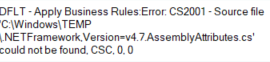
CS2001 Missing AssemblyAttributes.cs when executing SSIS package deployed to the server

If you get this error;

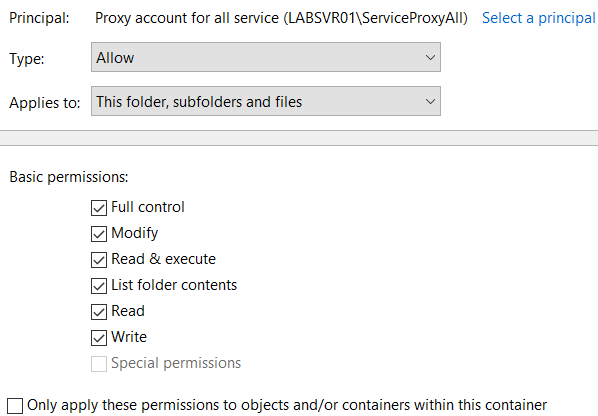
The reson is permissions;

Navigate to c:\windows\temp. On the temp folder, right click properties, security and advanced. Add your proxy account here and give it full permissions;

Resource

https://stackoverflow.com/questions/35347632/cs2001-missing-assemblyattributes-cs-when-executing-ssis-package-deployed-to-the