There are multiple methods that can be used to import stored procedures results into tables.
OPENROWSET AND OPENQUERY methods require that stored procedures don’t have;
temp tables inside
Don’t return duplicate columns
There is no need for a linked server, but you would need to get the connection string right. You need to specify the full path to the stored procedure including the database name and the stored procedure owner.
METHOD–1 Using OPENROWSET
This is one time step to configure database server.
--one time step
sp_configure 'Show Advanced Options', 1
GO
RECONFIGURE
GO
sp_configure 'Ad Hoc Distributed Queries', 1
GO
RECONFIGURE
GO
You can run your stored procedures that will load data into tables;
IF OBJECT_ID('tempdb..#STG_OPENROWSET') IS NOT NULL DROP TABLE #STG_OPENROWSET
SELECT * INTO #STG_OPENROWSET FROM OPENROWSET('SQLNCLI',
'Server=(local);Trusted_Connection=yes;',
'EXEC DatabaseName.[dbo].[StoredProcedureName] @param1 = 1, @param2 = 2020')
SELECT * FROM #STG_OPENROWSET
DROP TABLE #STG_OPENROWSET
METHOD–2 Using OPENQUERY.
This is one time step to configure database server.
You can run your stored procedures that will load data into tables;
IF OBJECT_ID('tempdb..#STG_OPENQUERY') IS NOT NULL DROP TABLE #STG_OPENQUERY
SELECT  * INTO    #STG_OPENQUERY
FROM    OPENQUERY(DatabaseServerName,
'EXEC	Database.[dbo].[StoredProcedureName] @param1 = 1, @param2 = 2020');
SELECT * FROM #STG_OPENQUERY
DROP TABLE #STG_OPENQUERY
If stored procedures are using temp tables or returning duplicate columns, you will get these errors using Method-1 and Method-2;
invalid object #tablename.
Duplicate column names are not allowed in result sets obtained through OPENQUERY and OPENROWSET”
OPENROWSET are not allowed in Azure SQL. They are allowed in a VM that is connected to Azure.
METHOD–3 Manually create temp tables
There is no database configuration required.
You can run your stored procedures that will load data into tables;
--the proce is using temp tables so this is work around
IF OBJECT_ID('tempdb..#STG_TempTable') IS NOT NULL DROP TABLE #STG_TempTable
CREATE TABLE #STG_TempTable
(
	ID int,
	[name] nvarchar(255),
	shortName nvarchar(25),
)
INSERT #STG_TempTable
EXEC [dbo].[StoredProcedureName] @param1 = 1, @param2 = 2020
SELECT * FROM #STG_TempTable
By using this method, your database administrator will be happy because you are not making any security related changes at database server level.
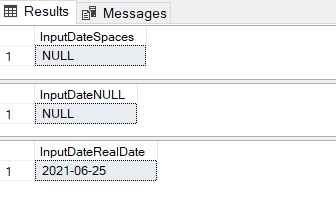
This is how to check NULL or empty input values for a date column. Currently NULL or empty values produces ‘1900-01-01’ value which is not acceptable.
DECLARE @InputDate DATE

--set input to spaces
SET @InputDate = ''
--don't want 1900-01-01 output, instead NULL value
SELECT ISNULL(NULLIF(@InputDate, ''), NULL) AS InputDateSpaces

--set input to null
SET @InputDate = NULL
--don't want 1900-01-01 output, instead NULL value
SELECT ISNULL(NULLIF(@InputDate, ''), NULL) AS InputDateNULL

--set input to date
SET @InputDate = '2021-06-25'
--don't want 1900-01-01 output, instead date value
SELECT ISNULL(NULLIF(@InputDate, ''), NULL) AS InputDateRealDate
Change data capture (CDC) records insert, update, and delete activity that applies to a SQL Server table. This makes the details of the changes available in an easily consumed relational format.
To enable CDC, run this;
-- COMMAND TO ENABLE CDC on the Database
EXEC sys.sp_cdc_enable_db
GO
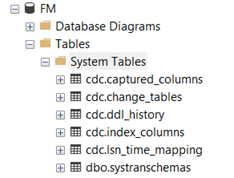
Look under Database Name -> Tables -> System Tables
When a database is enabled for change data capture, the cdc schema, cdc user, metadata tables, and other system objects are created for the database. The cdc schema contains the change data capture metadata tables and, after source tables are enabled for change data capture, the individual change tables serve as a repository for change data. The cdc schema also contains associated system functions used to query for change data.
-- COMMAND TO DISABLE CDC on the Database
EXEC sys.sp_cdc_disable_db
GO
This will remove all CDC related objects.
How do I use it?
Our business requirements is to handle data changes in underlying relational database. My team members are mostly web developers and for them it’s no brainer. They can handle changes in code and write those changes to the tables. Yes, it’s doable but this will increase solution complexity and cost of the project. Budget is another limitation.
Microsoft SQL server offers CDC feature. Why not to leverage this feature and customize it to handle our situation.
Here is a prototype for implementing this feature. I am assuming that a database already exists with “FM” schema, all tables has primary key and SQL Server Agent is running.
Follow these steps;
We need to enable CDC on all tables. Run this script to enable CDC;
USE FM
go
if exists(select 1 from sys.databases where name ='FM' and is_cdc_enabled =1)
EXEC sys.sp_cdc_disable_db

go
-- COMMAND TO ENABLE CDC on the Database
EXEC sys.sp_cdc_enable_db
GO

DECLARE @source_schema sysname, @source_name sysname

DECLARE #finstance CURSOR LOCAL fast_forward
FOR
	select table_name,TABLE_SCHEMA from information_schema.tables
	where table_name in(
				select distinct table_name from INFORMATION_SCHEMA.KEY_COLUMN_USAGE where constraint_name like 'PK%')
				and table_schema ='FM'  and TABLE_NAME not in ('sysdiagrams')

OPEN #finstance
FETCH #finstance INTO @source_name,@source_schema

WHILE (@@fetch_status <> -1)
BEGIN
    print 'Schema is ' + @source_schema + ' , ' +  'Table Name is ' +@source_name

	EXEC [sys].[sp_cdc_enable_table]
		@source_schema
		,@source_name
		,@role_name = NULL
		,@supports_net_changes = 1

	FETCH #finstance INTO @source_name,@source_schema
END

CLOSE #finstance
DEALLOCATE #finstance
GO
To test, Make sure Project Table is empty. Let’s test CDC;
SELECT * FROM [FM].[Project]
SELECT * FROM [cdc].[FM_Project_CT]
UPDATE [FM].[Project]
SET
	ProjectTitle = N'some other title',
	ProjectDescription = N'someones novel...'
WHERE ID = N'E90F6FD5-CCCA-EB11-ACB9-8CC84B4006DC'
Here is the result;
Great. I can see the feature works fine.
The developer can use following query to get complete picture;
SELECT
	src.id,
	Operation = CASE trgt.[__$operation]
		When 1 Then 'Delete'
		WHEN 2 Then 'Insert'
		WHEN 3 Then 'Update row before the change'
		WHEN 4 Then 'Update row after the change'
		ELSE 'Unknown'
	END,
	src.projectTitle sTitle, src.projectdescription sProjectDescription,
	trgt.projectTitle tTitle, trgt.projectdescription tProjectDescription
FROM [FM].[Project] src
JOIN [cdc].[FM_Project_CT] trgt on src.id = trgt.id
Here are the results;
A little bit explanation about tracking table;
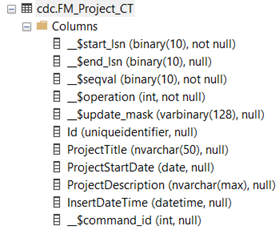
When the feature is enabled on a table, the change table named cdc.<captured_instance>_CT is automatically created in the tracked database. The table contains a row for each insert and delete on the source table, and two rows for each update. The first one is identical to the row before the update, and the second one to the row after the update. To query the table, use the cdc.fn_cdc_get_all_changes and cdc.fn_cdc_get_net_changes functions
The first five columns contain the metadata necessary for the feature, the rest are the exact replica of the source table __$start_lsn – the Log Sequence Number of the commited transaction. Every change committed in the same transaction has its own row in the change table, but the same __$start_lsn __$end_lsn – the column is always NULL in SQL Server 2012, future compatibility is not guarantee __$seqval – the sequence value used to order the row changes within a transaction __$operation – indicates the change type made on the row
Delete
Insert
Updated row before the change
Updated row after the change
__$update_mask – similar to the update mask available in Change Tracking, a bit mask used to identify the ordinals of the modified columns
How do I customize this feature to work as per my requirements?
DDL changes (New tables, column changes) affect this process. Disabling CDC will remove all cdc generated tables and data. Enable CDC will recreate all cdc tables. I can not risk loosing data!
One method to solve is to create another database, say FMAudit. Copy all cdc generated tables to that database (use Generate schema feature of SQL Server). Create a schedule process (use SSIS or windows service) that will copy and truncate data from source database. Use SQL Agent and Keep process schedule time to 10 seconds.