
Is it a good idea to use table locks? Here is a list of articles that talk about this;
Category: Data Engineering
All about Azure Databases, Azure single database, Azure managed instance, Azure Cosmos database, Azure VM based databases
SSIS Script component – Get Blob Data column
Recently I have to move varbinary(max) data from one database to another database using script component.
When dealing with varbinary(max), there are two scenarios:
- the length of the data is moderate
- the length of the data is big
GetBytes() is intended for the this scenario, when we are using CommandBehaviour.SequentialAccess to ensure that we are streaming the data, not buffering it. In particular, in this usage we would usually be writing (for example) in a stream, in a loop. For example:
// moderately sized buffer; 8040 is a SQL Server page, note
byte[] buffer = new byte[8040];
long offset = 0;
int read;
while((read = reader.GetBytes(col, offset, buffer, 0, buffer.Length)) > 0) {
    offset += read;
    destination.Write(buffer, 0, read); // push downstream
}
However! If we are using moderately sized data, then use this code:
byte[] data = (byte[])reader[col];Obviously the output column data type would be “image [DT_IMAGE]” in script component.
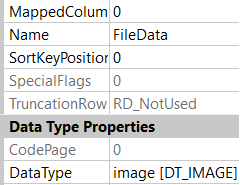
Finally to make it part of output;
OutputBuffer.FileData.AddBlobData((byte[])sqlReader["FileData"]);Sources
SQL Server database stuck in Restore state
Run this script;
RESTORE DATABASE [mydatabase] WITH RECOVERYResources;
https://www.mssqltips.com/sqlservertip/5460/sql-server-database-stuck-in-restoring-state/
SSIS Excel Data Source Column overriding
When an excel data source is used in SSIS, the data types of each individual column are derived from the data in the columns. How do we override this behaviour?
Ideally we would like every column delivered from the excel source to be string data type, so that data validation can be performed on the data received from the source in a later step in the data flow.
Just go into the output column list on the Excel source and set the type for each of the columns. Let excel do its guessing game. We are interested in output column and type. This works.
To get to the input columns list right click on the Excel source, select ‘Show Advanced Editor’, click the tab labeled ‘Input and Output Properties’.
A potentially better solution is to use the derived column component where you can actually build “new” columns for each column in Excel. This has the benefits of
- You have more control over what you convert to.
- You can put in rules that control the change (i.e. if null give me an empty string, but if there is data then give me the data as a string)
- Your data source is not tied directly to the rest of the process (i.e. you can change the source and the only place you will need to do work is in the derived column)
This is another work around but it does not work at run time. You can see the data at design time though;
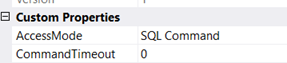
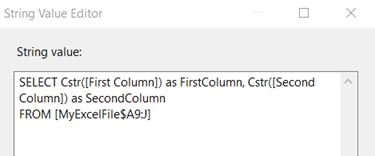
Write your SQL command and convert columns to text.
You can verify this on Advance tab / Input and Output Properties tab of Excel source. All of converted columns under External Column would be changed to “Unicode text stream” data type
SSIS Expression Sample List
Sometime its kind a hard to remember different SSIS syntax and how to use them. I build up a list to help me out. Expressions used are from AdventureWorks sample provided with Microsoft SQL Server.
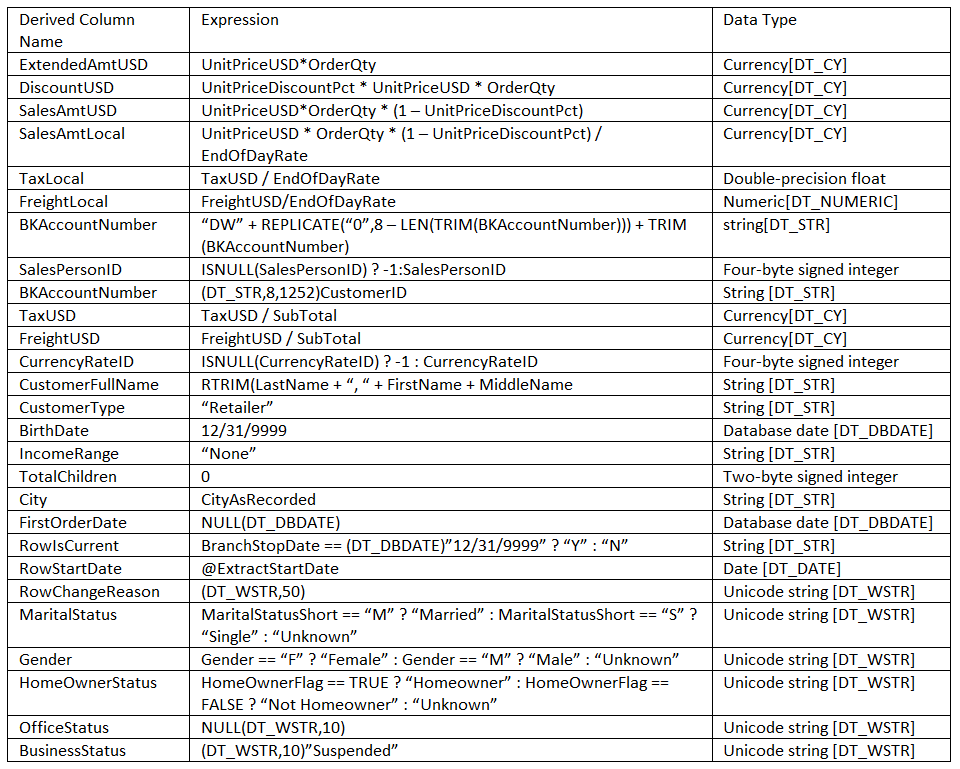
Converting String to Guid in Derived column expression;
(DT_GUID)("{" + [ColumnName] + "}")If using dynamic Sql in script component or variables, get Guid from database as String;
CAST([GuidColumn] AS NVARCHAR(60)) AS GuidColumnDatabase will convert string to Guid on query submission.
Boolean expression
If incoming data type is text then use this for Boolean conversion;
(DT_BOOL)((DT_WSTR,1)Rejected == “1” ? TRUE : FALSE )
This will also handle null values in incoming data.
How to Get file name and file extension in SSIS Expression?
Suppose this is the file name;
@FileName = 6be8bf19-b715-ec11-b1cb-000d3adde0a7.xlsx
This is how we will get extension and file name;
--get file extensions
REVERSE(left(REVERSE(@[User::FileName]), FINDSTRING(REVERSE(@[User::FileName]) , "." , 1 ) - 1))

Result
------
xlsx

------get file name
SUBSTRING(@[User::FileName], 1, FINDSTRING(@[User::FileName] , "." , 1 ) - 1)

Result
------
6be8bf19-b715-ec11-b1cb-000d3adde0a7

--same result can be achieved by using this statement

REVERSE(LEFT(@[User::FileName], FINDSTRING(@[User::FileName] , "." , 1 ) - 1))

Result
------
6be8bf19-b715-ec11-b1cb-000d3adde0a7
How to get only Date from DateTime variable?
SUBSTRING( (DT_STR,50, 1256)DATEADD("DAY",-1,GETDATE()) , 1, 10)