Common usage is stock & inventory valuation for tracking and taxation purpose.
Category: App Services
All about application services for example, Azure App Service. Angular application, Microsoft .NET Core and EF
Excel dropdown list with number and text
There are two methods;
Data validation drop down
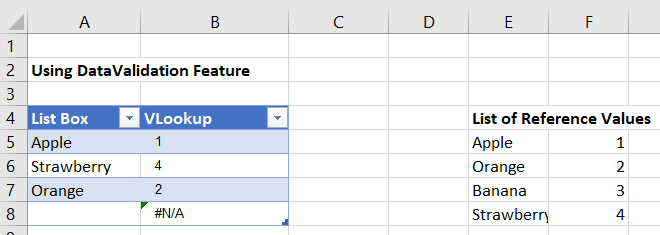
There is a list option in Data validation. If this is combined with a VLOOKUP formula you would be able to convert the selected value into a number.
The steps in Excel 2010/2019 are:
- Create your list with matching values.
- On the Data tab choose Data Validation
- The Data validation form will be displayed
- Set the Allow dropdown to List
- Set the Source range to the first part of your list
- Click on OK (User messages can be added if required)
In a cell enter a formula like this
=VLOOKUP(A5,$E$5:$F$8,2,FALSE)
which will return the matching value from the second part of your list.

Form control drop down
Alternatively, Form controls can be placed on a worksheet. They can be linked to a range and return the position number of the selected value to a specific cell.
If you don’t see Developer tab in Excel ribbon, follow this link;
The steps in Excel 2010/2019 are:
- Create your list of data in a worksheet
- Click on the Developer tab and dropdown on the Insert option
- In the Form section choose Combo box or List box
- Use the mouse to draw the box on the worksheet
- Right click on the box and select Format control
- The Format control form will be displayed
- Click on the Control tab
- Set the Input range to your list of data
- Set the Cell link range to the cell where you want the number of the selected item to appear
- Click on OK

IEnumerable vs IQueryable
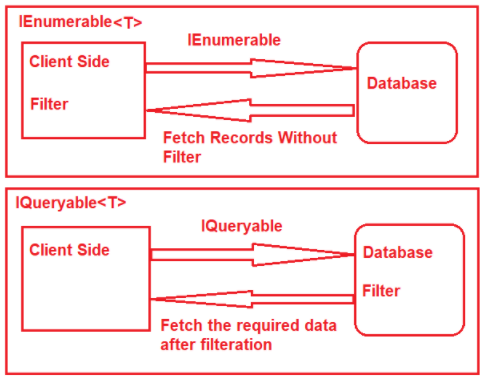
The IEnumerable and IQueryable are used to hold a collection of data and also used to perform data manipulation operations such as filtering, Ordering, Grouping, etc.
The main difference is this;

We can use SQL Profiler to confirm this behavior.
All about LINQ operators
A short list of LINQ operators.
Using IN clause
This is similar to database IN keyword;
var myInClause = new string[] {"One", "Two", "Three"};
var results = from x in MyTable
where myInClause.Contains(x.SomeColumn)
select x;
// OR
var results = MyTable.Where(x => myInClause.Contains(x.SomeColumn));
Using ALL operator
Working with simple types
//does all numbers are greater than 10
int[] IntArray = { 11, 22, 33, 44, 55 };
var Result = IntArray.All(x => x > 10);
Console.WriteLine("Is All Numbers are greater than 10 : " + Result);
//does all names has characters greater than three
string[] stringArray = { "Khan", "Ali", "Adam", "Eve", "Joe" };
Result = stringArray.All(name => name.Length > 3);
Console.WriteLine("Is All Names are greater than 3 Characters : " + Result);
var letterResult = stringArray.All(name => name.StartsWith("A"));
Console.WriteLine("Is All Names start with letter A : " + letterResult);
//all numbers can be divided by three
int[] numbers = { 3, 6, 9, 12};
bool iSNumbersDivided = numbers.All(number => number % 3 == 0);
Console.WriteLine($"Numbers are divisible by three = {iSNumbersDivided}");
Working with complex types
//Check whether age of all animals in the zoo is greater than 1 year
bool response = animalData.All(x => x.AnimalAge > 1);
Console.WriteLine($"Is All Animals are greater than 1 years old : {response}");
//get all animas who are feed by milk
var zooSubSet = animalData.Where(x => x.Food.All(y => y.FoodType == "Milk"));
foreach(var item in zooSubSet)
{
Console.WriteLine($"Animal Name: {item.AnimalName}");
}
Resources
https://stackoverflow.com/questions/959752/where-in-clause-in-linq
https://coderedirect.com/questions/644629/linq-nested-list-contains
Handling custom dataset in C#
I am receiving this dataset from a remote server;
TagNumber TagCode CageNumber FoodType FoodValue
A-2021-1 WHITE A9:I10 Milk A11:I
A-2021-1 WHITE A9:I10 Corn A10:I
A-2021-1 RED A11:I13 Meat B1:B2
A-2021-1 RED A11:I13 Hay A14:I
A-2021-1 GREEN A8:J9 Milk B1:B2
A-2021-1 GREEN A8:J9 Milk A10:J
I need to create this object, a complex type;
public class Animal
{
public string TagNumber { get; set; }
public string TagCode { get; set; }
public string CageNumber { get; set; }
public List<AnimalFood> Food { get; set; }
}
public class AnimalFood
{
public string FoodType { get; set; }
public string FoodValue { get; set; }
}
There could be many ways to handle this. This is one of them;
Create a dictionary object using LINQ GroupBy and TagCode column from incoming dataset;
var allAnimals = animalData
.GroupBy(item => item.TagCode)
.ToDictionary(grp => grp.Key, grp => grp.ToList());
Create unique animals out of dictionary object;
var uniqueAnimals = allAnimals.Keys.Distinct().ToList();
Create the object (animal) and add them to zoo :);
var zoo = new List<Animal>();
foreach (string animal in uniqueAnimals)
{
var animalRow = allAnimals[animal];
var animalRowFirst = animalRow.FirstOrDefault();
var animalRecord = new Animal
{
TagNumber = animalRowFirst.TagNumber,
TagCode = animalRowFirst.TagCode,
CageNumber = animalRowFirst.CageNumber
};
//time for food
var animalFood = new List<AnimalFood>();
foreach(var item in animalRow)
{
item.Food.ForEach(x =>
{
animalFood.Add(new AnimalFood
{
FoodType = x.FoodType,
FoodValue = x.FoodValue
});
});
}
//this is our custom type
animalRecord.Food = animalFood;
zoo.Add(animalRecord);
}
Sample output;

It’s easier to apply different filters on this object;
var animalFilter = zoo.Where(x => x.TagCode.ToUpper() == "WHITE");
Resources
https://stackoverflow.com/questions/3186818/unique-list-of-items-using-linq