
This is how we can read data from Microsoft Excel using OleDb in SSIS;
public override void CreateNewOutputRows()
    {
        //Change this to your filename you do not need a connection manager
        string fileName = @"E:\SFTP\RSS\Results.xlsx";
        string SheetName = "Sheet1";
        string cstr = "Provider=Microsoft.ACE.OLEDB.12.0;Data Source=" + fileName + ";Extended Properties=\"Excel 12.0;HDR=YES;IMEX=1\"";

        using (System.Data.OleDb.OleDbConnection xlConn = new System.Data.OleDb.OleDbConnection(cstr))
        {
           xlConn.Open();
           System.Data.OleDb.OleDbCommand xlCmd = xlConn.CreateCommand();
           xlCmd.CommandText = "Select * from [" + SheetName + "$]"; //I assume this is the data you want
           xlCmd.CommandType = CommandType.Text;
           using (System.Data.OleDb.OleDbDataReader rdr = xlCmd.ExecuteReader())
           {
              while (rdr.Read())
              {
                 for (int i = 4; i < rdr.FieldCount; i++) //loop from 5th column to last
                 {
                    //The first 4 columns are static and added to every row
                    Output0Buffer.AddRow();
                    Output0Buffer.UniqueID = Int32.Parse(rdr[0].ToString());
                    Output0Buffer.Year = Int32.Parse(rdr[1].ToString());
                    Output0Buffer.ReportingWave = rdr.GetString(2);
                    Output0Buffer.SubmissionDate = rdr.GetString(3);
                    Output0Buffer.Question = rdr.GetName(i);
                    Output0Buffer.Answer = rdr.GetString(i);
                 }

            }
          }
          xlConn.Close();
       }
    }
We need to add output columns with correct data type. There is no need to setup connection manager because we are using it in the code.
This code will successfully import a file that looks like this;
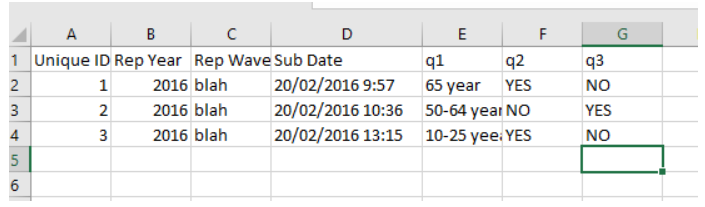
My recent experience with Excel Sheet.
Check the data type of the column. If the type is “General”, then ACE will determine data type based on first 8-10 rows. If those are numeric then it might ignore alpha-numeric data in the column. Try to change column data type to “Text” and see what happens. It will work. You would be able to see numeric and non-numeric data in your data pipe line.
Resources;

 Add to favorites
