Configure Azure DevOps for SSIS Projects

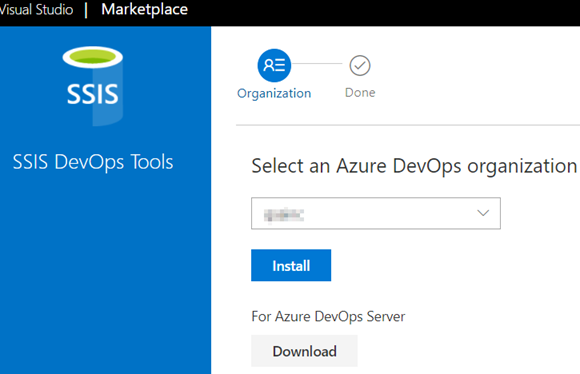
Install SSIS DevOps Tool in Azure DevOps organization.
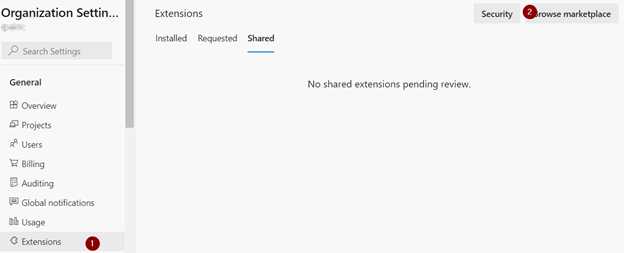
Click on “Browse marketplace” and Search for “SSIS DevOps Tools”. Here is the link.
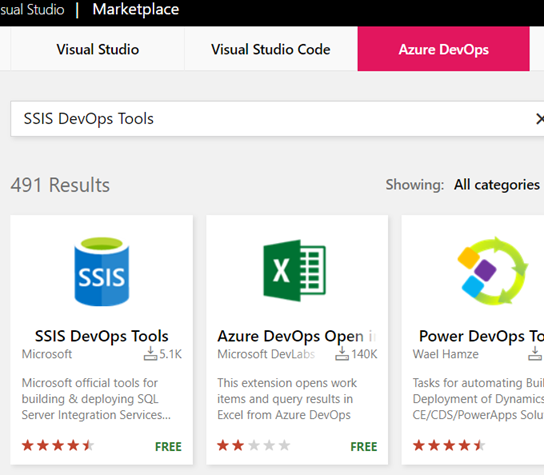
https://docs.microsoft.com/en-us/sql/integration-services/devops/ssis-devops-overview?view=sql-server-ver15

If you want to install extensions using CLI, here is the link;

https://docs.microsoft.com/en-us/azure/devops/marketplace/overview?tabs=azure-devops-cli&view=azure-devops&preserve-view=true#add-an-extension

Select “SSIS DevOps Tool”;

Click Install and you are done.

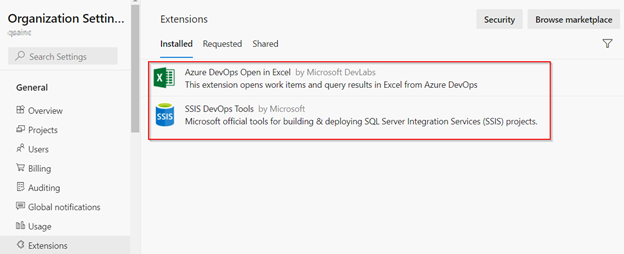
Install a second extension “Azure DevOps Open in Excel”. This helps to view work items in Excel and VS.

Go back to your Azure DevOps organization. The installed extensions are here;
Follow this article to create SSIS DevOps pipeline.

https://docs.microsoft.com/en-us/sql/integration-services/devops/ssis-devops-overview?view=sql-server-ver15

FavoriteLoadingAdd to favorites

RECENT POSTS


Categories


Tags

ADO ai angular asian asp.net asp.net core azure ACA azure administration Azure Key Vault Azure Storage Blazor WebAssembly BLOB bootstrap Branch and Release flow c# containers css datatables design pattern docker excel framework Git guide HTML JavaScript jQuery json knockout lab LINQ linux powershell REST API smart home SQL Agent SQL server SSIS SSL SVG Icon typescript visual studio Web API window os wordpress


ARCHIVE


DISCLAIMER