
If your organization was created with a Microsoft account, connect your organization to your Azure Azure AD. Sign in to Azure DevOps Services with the same username and password that you use with your Microsoft services. Enforce policies for accessing your team’s critical resources and key assets.
There’s no downtime during this change, but users are affected. Let them know before you begin.
Sign in to your organization https://dev.azure.com/{yourorganization}
Select Organization settings -> Users.
Compare Azure DevOPS email list with your Azure AD email list. Create an Azure AD email address entry for every user who’s in the Azure DevOPS organization and not in the Azure AD.
Connect organization to Azure AD by selecting Azure Active Directory.

Click on Connect directory;
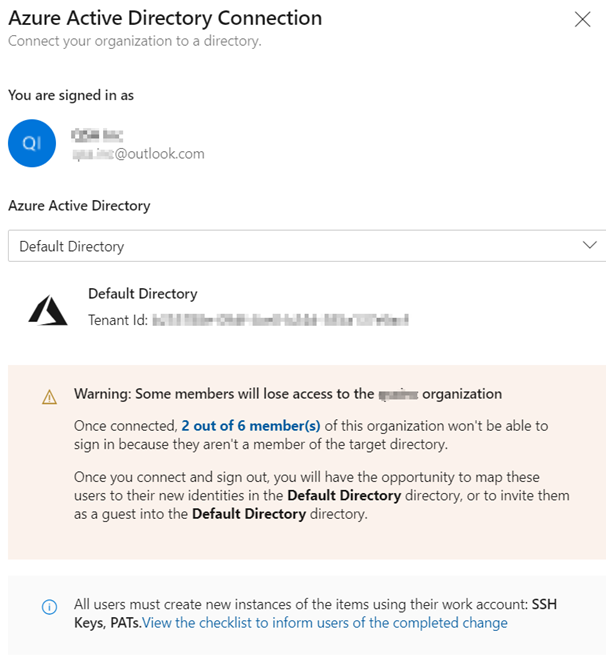
2 out of 6 members(s) are the members that doesn’t exist in Azure AD. They are guest developers using their hotmai/gmail account. If we want to allow them to use Azure DevOPS, we need to create their accounts as Guest in Azure AD.
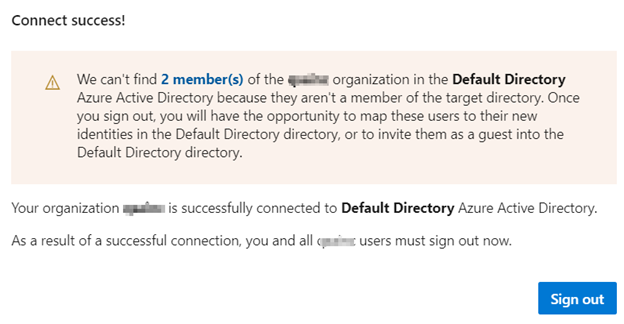
Sign out of Azure DevOPS.
Sign in with your Azure AD account. If you click on Organization Settings -> Azure Active Directory, you will see this page;
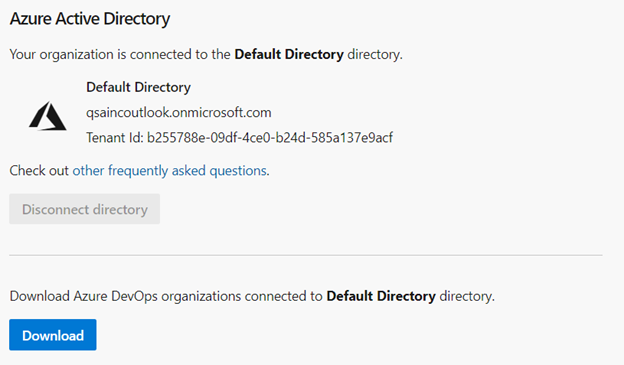
Clicking on Download will download your organization info, Azure DevOPS info and Owner of Azure DevOPS environment and any errors in the connect. This ensures that Azure DevOPS is connected with Azure.
Make adam@{yourorganization}.onmicrosoft.com as “Project Collection Administrators”. This role perform all kind a operations.
Test your access on Azure DevOps and Visual Studio. You will be asked to enter your credentials and approval from Microsoft Authenticator.
Resource;

 Add to favorites
