
Running WordPress on containers isn’t the hard part anymore — operating it correctly at the edge is.
This article documents my real-world experience migrating a production WordPress site to Azure Container Apps and then introducing Azure Front Door as a shared edge layer — with zero downtime, managed TLS, and a clean rollback strategy.
No theory. Just what actually worked.
Starting Point
- WordPress running in Azure Container Apps
- Public ACA ingress working
- Apex domain only (no
www) - DNS hosted in Azure DNS
- Old Azure App Service still existed as a fallback
At this stage, the site was functional — but directly exposed.
That meant:
- No global edge
- No centralized TLS strategy
- No bot mitigation
- No clean path for future apps
Why Add Azure Front Door?
I didn’t add Front Door for performance alone.
I added it because it establishes a clear architectural boundary:
Internet
   ↓
Azure Front Door (edge, TLS, security)
   ↓
Azure Container Apps (origin)
   ↓
WordPress
This separation matters more than people realize.
Key Design Decisions (and Why They Matter)
1. Front Door Is a Shared Service
Front Door does not belong to a single app.
It lives in a shared resource group because:
- It will front multiple apps later
- It owns certificates and security posture
- It changes less frequently than workloads
This single decision avoids future rework.
2. No Downtime DNS Strategy
The order of operations was critical:
- Create Front Door without touching DNS
- Wire Front Door → ACA using the containerapps.io hostname
- Test via
*.azurefd.net - Add custom domain to Front Door
- Validate domain using TXT record (safe)
- Only then switch DNS using an Alias A record
Rollback was instant:
- Delete Alias
- Restore old A record
No drama.
3. Managed TLS Everywhere
Both ACA and Front Door used managed certificates.
No Key Vault.
No renewals.
No cron jobs.
TLS became an implementation detail — exactly how it should be.
4. ACA Ingress Lockdown (Reality Check)
The plan was to lock ACA ingress to Front Door only.
Reality:
- Azure Container Apps does not support Front Door service tags
- Static IP allowlists are fragile
- Header-based enforcement isn’t first-class yet
Decision:
Leave ACA ingress open temporarily, and enforce security at the edge.
This wasn’t a failure — it was an informed architectural decision.
Bot Protection: What Actually Works on Front Door Standard
One important lesson:
Managed OWASP & Bot rule sets now require Front Door Premium.
On Standard, real protection comes from:
- Rate limiting
- Endpoint-specific throttling
- Edge enforcement (before ACA ever sees traffic)
What I implemented
- Global per-IP rate limiting
- Aggressive limits on
/wp-login.php - Optional limits on
/xmlrpc.php
This stopped:
- Brute-force attempts
- Credential stuffing
- Scrapers
For a WordPress blog, this covered 90% of real-world abuse at a fraction of the cost.
RBAC & Governance Lessons
Another surprise (but an important one):
- Global Admin ≠ Azure Resource Owner
- Contributor cannot manage resource locks
- Locks require Owner or User Access Administrator
Azure intentionally separates:
- Identity authority (Entra ID)
- Resource authority (Azure RBAC)
It’s inconvenient — but correct.
Final Architecture
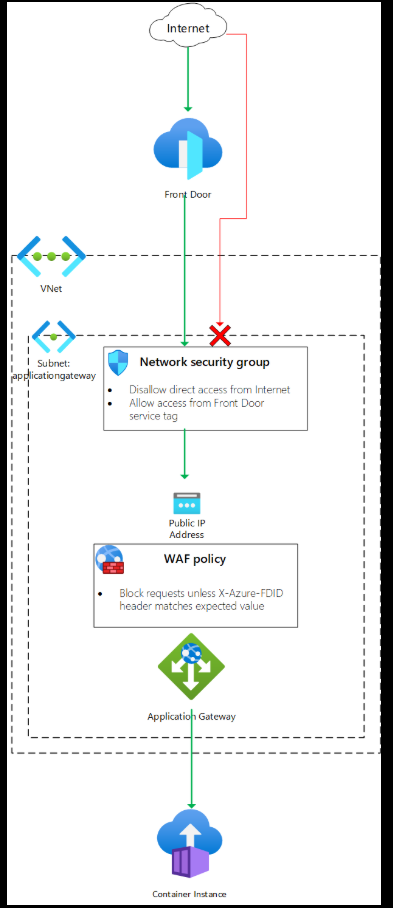
Final state:
- Azure Front Door as shared edge
- WordPress on Azure Container Apps
- Managed TLS end-to-end
- Rate-limited bot protection
- Clean DNS alias cutover
- Old App Service safely retired
What I’d Do the Same Again
- Treat Front Door as a platform capability
- Test everything before DNS changes
- Prefer managed services over custom plumbing
- Accept platform limits early instead of fighting them
What I’d Change Next Time
- Plan WAF tier selection earlier (Standard vs Premium)
- Document RBAC needs upfront
- Automate rate-limit rules via IaC sooner
Final Takeaway
Containers are easy. Edges are where architecture shows.
Using Azure Front Door in front of Azure Container Apps gave me:
- A clean security boundary
- A future-proof edge
- Zero-downtime migration
- Operational simplicity
This setup scales from a personal blog to multi-app platforms without changing the fundamentals — and that’s the real win.

 Add to favorites
Leave a Reply
You must be logged in to post a comment.